

Most campaigns should track canvassing with a mobile field app that syncs to a CRM in real time. It cuts data entry errors, gives you same-day visibility into who was contacted, and holds volunteers accountable for the doors they were assigned. That's the default. The main alternatives are:
- Paper forms — cheap, works with zero connectivity, but data sits idle until someone transcribes it (often days later, if ever).
- Spreadsheets — better than paper for small teams, but they break down fast with multiple canvassers and no version control.
- Mobile field apps with CRM sync — the standard for organized campaigns. Real-time updates, route assignment, and duplicate detection are built in.
- GPS/verified drops — layered onto an app to confirm a canvasser actually reached a door, useful for accountability and paid canvasser oversight.
If your turf has spotty cell service, don't abandon digital tools entirely. Use structured paper forms with a mandatory end-of-shift sync rule: every sheet gets entered into the system before volunteers go home, no exceptions. That single rule prevents the majority of lost data in rural and low-connectivity canvasses.
Key Takeaways
Accurate canvassing tracking depends on matching the method to your campaign's scale and connectivity, then enforcing a strict end-of-shift sync rule no matter which tool you use.
| Point | Details |
|---|---|
| Match method to scale | Use mobile field apps with CRM sync above 500 doors a week; spreadsheets and paper work for smaller teams. |
| Separate fields by phase | ID/petition, persuasion, and GOTV canvassing each need different data fields and follow-up logic. |
| Enforce same-day sync | Require every device and paper sheet to sync or get transcribed the same day to prevent data loss. |
| Track five core metrics | Capture doors knocked, contacts, persuasion outcomes, follow-ups, and verified drops every shift. |
| Use Campaign Buddy HQ for app-first tracking | Its offline sync and daily planning tools directly target the sync and dedupe failures common in DIY setups. |
Table of Contents
- Canvassing Tracking Methods by Canvass Type
- What Do the Main Canvassing Tracking Methods Look Like in Practice?
- How Should You Choose a Canvassing Tracking Method?
- Day-of Canvassing Workflows and the Metrics That Matter
- Implementation Checklist for Canvassing Tracking
- What Campaigns Get Wrong About Canvass Data
- Track Canvassing Progress With Campaign Buddy HQ
- Frequently Asked Questions
- Sources
Canvassing Tracking Methods by Canvass Type
Not all canvassing asks for the same data, and that's where a lot of campaigns get tripped up. ID/petition canvassing, persuasion canvassing, and GOTV (get-out-the-vote) canvassing each require different fields, different urgency, and different follow-up logic, according to the States Win canvass training guide.
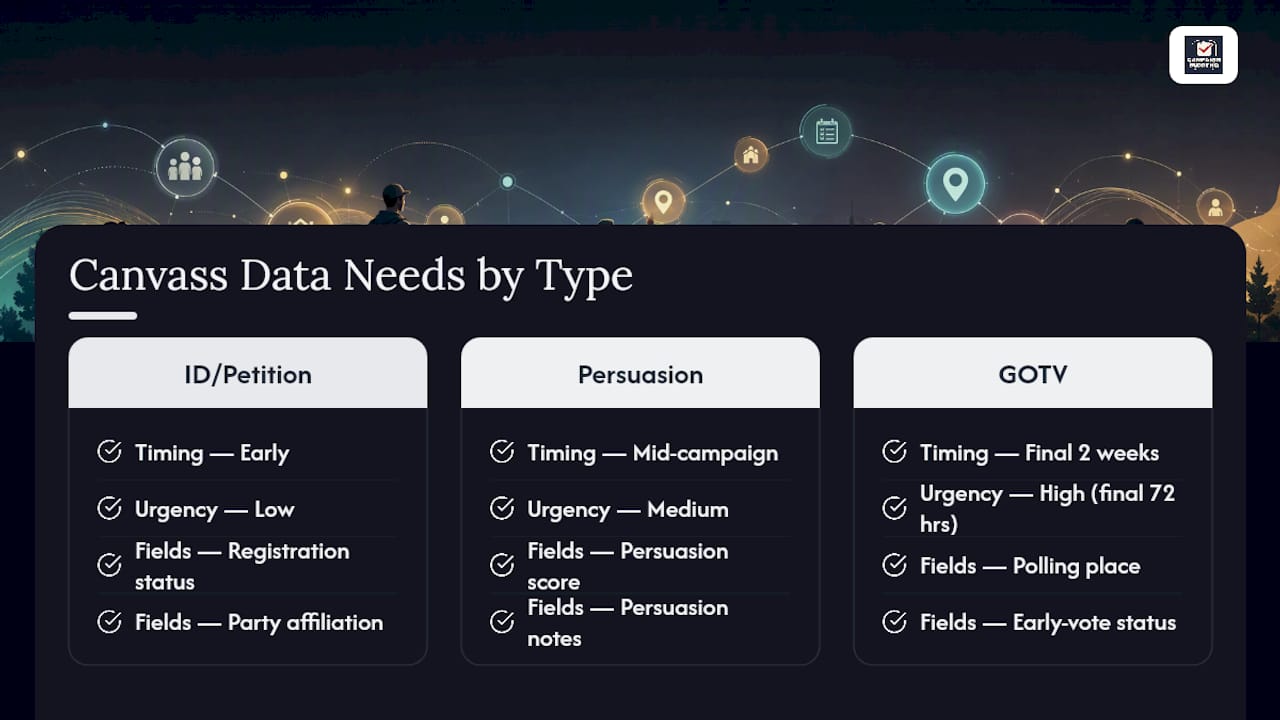
ID and petition canvassing happens early. You're identifying supporters, collecting signatures, or registering voters, so your tracking needs registration status, party affiliation (where public), and signature validity fields. Speed matters less here than accuracy, because bad data at this stage poisons every later phase.
Persuasion canvassing sits in the middle of the campaign calendar, usually months before Election Day. This is where a persuasion score (a 1 to 5 or 1 to 10 rating of how likely someone is to support your candidate or issue) becomes the central data point. Tracking needs to capture not just the score but notes on what argument moved someone, since that informs mail and digital messaging later.
GOTV canvassing happens in the final stretch, often the last two weeks and especially the final 72 hours. Here, tracking priorities flip: you care less about persuasion and more about turnout logistics. Polling place, early vote status, and confirmed turnout intent become the fields that matter. A voter you scored as a strong supporter in September doesn't need another persuasion conversation in late October. They need a reminder and a ride.
The timing shift matters operationally. Campaigns that keep using persuasion-phase fields during GOTV waste volunteer time re-asking questions they already have answers to. Campaigns that switch too early to GOTV-only fields lose the chance to move undecided voters. Knowing which phase you're in should dictate the form your canvassers carry that day, not just the walk-list.
What Do the Main Canvassing Tracking Methods Look Like in Practice?
Here's how each method actually plays out on a Saturday morning with volunteers standing in a parking lot waiting for turf assignments.
1. Paper forms. A well-designed paper canvass sheet has one row per address, checkboxes for contact outcome (not home, refused, contacted), a small notes column, and a clear "phase" label at the top so nobody confuses a persuasion sheet with a GOTV sheet. The upside: zero battery anxiety, zero app-crash panic, and volunteers who aren't comfortable with smartphones can still contribute. The downside is real, though. Data doesn't exist anywhere useful until someone manually enters it, and handwriting errors compound at scale. The fix is a hard rule: sheets get transcribed the same day, ideally within an hour of the shift ending.

2. Spreadsheets. A shared spreadsheet works fine for a five-person canvass team knocking on 200 doors. It falls apart at 500 doors and multiple simultaneous shifts, because two people editing the same file invites overwritten rows and duplicate entries. If you're using a spreadsheet, lock down column structure from day one (address, date, canvasser initials, outcome, notes) and assign one person as the sole editor who merges data at day's end.
3. Mobile field apps. This is the category that solves the shared-editing problem, since most field apps allow offline capture. A canvasser walks a route with no signal, taps outcomes as they go, and the app queues the data to upload once it finds a connection again. Apps in this category commonly include route guidance and offline sync as standard features, which removes the "we lost half the sheets" problem paper carries. The trade-off is setup time. Someone has to load walk-lists, assign turf, and train volunteers before the first knock.
4. CRM sync. Whatever app you use, the data has to land somewhere central. Good CRM sync means deduplication rules run automatically (matching on name plus address, not just name alone) and updates happen in near real time rather than in a nightly batch job that leaves your Saturday numbers invisible until Monday. Weak sync timing is one of the most common reasons campaigns think they knocked fewer doors than they did.
5. GPS and verified drops. Adding location verification confirms a canvasser was physically at the address when they logged a contact, which matters most for paid canvass programs or when a campaign needs to defend its numbers to a funder or oversight body. Verified drops also add accountability for literature distribution, so a "not home, left a flyer" outcome carries the same weight as a live conversation. Always get consent before recording anything beyond basic contact outcome, and never capture data that isn't operationally necessary.
6. Hybrid approach. Most real campaigns run app-first with paper as backup, not as an equal partner. Every canvasser gets the app, but a stack of paper forms rides in the clipboard for dead zones or dead batteries. The sync rule stays the same either way: nothing goes home unsynced at the end of a shift.
Pro Tip: Give every volunteer a two-minute "what if the app crashes" drill before their first shift. The paper backup is only useful if people know where it lives and how to use it under pressure.
How Should You Choose a Canvassing Tracking Method?
The right answer depends on five things: how many doors you're knocking, how reliable your cell coverage is, what you can spend, how comfortable your volunteers are with a phone screen, and who legally owns the voter data once it's collected.
Run this three-question check before picking a method:
- Are you knocking more than 500 doors a week? If yes, you need a field app with CRM sync. Spreadsheets and paper can't keep pace without losing accuracy.
- Is connectivity unreliable across most of your turf? If yes, prioritize an app with strong offline capture, and keep paper as the explicit fallback rather than the primary system.
- Do you have volunteers who've never used a canvassing app before? If yes, budget real training time. A five-minute walkthrough the morning of a shift isn't training, it's a setup for lost data.
Field studies consistently find that face-to-face canvassing lifts turnout by roughly 7 to 10 percentage points compared to phone or digital-only outreach. That's the whole reason accurate tracking matters this much: a turnout gain of several percentage points is worth protecting with data you can actually trust and act on, not guess at from memory or a stack of unlogged paper.
Beyond the rubric, weigh the operational trade-offs honestly. A more capable app costs more setup time up front. A stricter device policy (assigning tablets vs. relying on volunteers' own phones) means fewer app-comfort issues but a bigger equipment budget. And backups matter regardless of method: even the best CRM sync should export data nightly to a second location, because software fails and campaigns that lose a week of canvass data rarely recover the goodwill it takes to re-knock those doors.
Day-of Canvassing Workflows and the Metrics That Matter
A canvass shift runs in three phases, and each one has its own data discipline.
Before the shift:
- Load walk-lists and confirm turf assignments match the current campaign phase (ID, persuasion, or GOTV).
- Charge devices, pack paper backups, and confirm every volunteer's app login works before they leave the staging location.
- Brief the team on the day's script and the specific data fields for that phase.
During the shift, canvassers log contact outcome, any persuasion score or GOTV response, and notes on next steps, ideally at the door rather than from memory later. Safety protocols matter here too: pair inexperienced volunteers with someone familiar with the turf, and set a check-in time so field leads know if someone hasn't reported back.
After the shift:
- Sync every device, whether app-based or paper, within the same day.
- Run a dedupe pass to catch the same address logged twice by different canvassers.
- Update the CRM and pull a quick performance snapshot before the team disperses, while questions are still fresh.
The minimal metric set every campaign should capture, regardless of method, comes down to five numbers: doors knocked, contacts made, persuasion or support outcomes, follow-ups needed, and verified drops. Skip any of these and you lose the ability to answer basic questions, like whether your canvass is actually moving voters or just logging activity. Organizing research backs this combination: campaigns that pair genuine, empathetic conversation quality with structured tracking scale better than either approach alone.
Implementation Checklist for Canvassing Tracking
Before your first shift, get these in place:
- Set up accounts and device access for every canvasser, and decide whether volunteers use personal phones or campaign-owned devices.
- Print walk-lists as backups even if you're running app-first, per standard field guide recommendations.
- Confirm data-sharing permissions so volunteers know what they can and can't do with voter information.
- Schedule a nightly export or backup of your CRM data.
On shift day, run a consistent meetup routine: assign roles (canvasser, driver, check-in coordinator), review the day's data fields, and set a hard end-of-shift sync deadline before anyone leaves.
Your minimal data template needs just five fields, labeled consistently across every form and app so dedupe checks actually work: address (standardized format), canvasser ID, date and time, contact outcome, and notes/next-step. If you're building your own template, Creative Commons licensed materials offer a starting point you can adapt rather than building from scratch.
If the app fails or a phone dies mid-shift, fall back to paper immediately and flag those sheets for priority entry that night, before the details fade from memory.
Pro Tip: Label every paper backup sheet with the same address-format convention your app uses. It sounds trivial, but mismatched formatting (123 Main St. vs. 123 Main Street) is the single biggest cause of duplicate voter records after a merged shift.
What Campaigns Get Wrong About Canvass Data
The failures I see repeat across cycles are almost always the same three things: skipping training because "the app is intuitive," treating end-of-shift sync as optional when volunteers are tired and want to go home, and building dedupe rules so weak that the same voter shows up three times under slightly different spellings.
The fixes aren't complicated. Pair a tech-comfortable volunteer with someone newer to the tools, so nobody's fumbling with login screens on a stranger's doorstep. Use simple, consistent tagging (a short list of outcome codes everyone memorizes, not a dropdown menu with thirty options). And keep pre-made templates on hand so you're not designing a form from scratch every cycle.
One more thing that gets overlooked: privacy isn't just a compliance checkbox. Volunteers should know what data they're allowed to collect, and campaigns should never ask canvassers to record anything beyond what the operation actually needs.
Track Canvassing Progress With Campaign Buddy HQ
Campaign Buddy HQ is built around the exact workflow this article recommends: an app-first system with real-time sync, not a patchwork of spreadsheets someone has to reconcile at midnight. It handles daily and weekly planning, logs doors, calls, texts, and registrations in one place, and gives field directors a live dashboard instead of a Monday-morning guessing game.
The platform's offline capture and sync design directly addresses the failure points covered above: no more lost paper sheets, no more duplicate voter records from mismatched address formats, no more volunteers who never got trained because nobody had time. It's also built with rural and low-density campaigns in mind, where connectivity gaps are the rule rather than the exception. If your campaign is still tracking canvass data on paper or in a shared spreadsheet that three people are editing at once, start a free 7-day trial and run your next canvass shift through it before you commit to anything.
Frequently Asked Questions
What's the best way to track canvassing progress without expensive software? A structured paper form with consistent fields, paired with a strict same-day data entry rule, works for small volunteer-run canvasses. It won't scale past a few hundred doors a week, but it beats an inconsistent spreadsheet nobody updates.
How do I stop volunteers from knocking the same door twice? Standardize your address format across every form and app, and run a dedupe check that matches on address plus name, not name alone. Most duplicate records trace back to formatting mismatches, not actual re-knocks.
Do I need a CRM if I'm running a small local campaign? Not necessarily at first, but even a basic CRM sync becomes valuable once you have more than one canvasser or one shift per week, since it centralizes data automatically instead of relying on someone to merge spreadsheets by hand.
What canvassing performance metrics should I report to my campaign manager? Doors knocked, contacts made, persuasion or support scores, follow-ups needed, and verified drops. Those five numbers answer whether your canvass is producing results, not just activity.
Is paper canvassing tracking still viable in 2026? Yes, as a fallback for low-connectivity areas or as a backup to an app-first system. It shouldn't be your primary method if you're running shifts above a few hundred doors a week, since transcription delays and handwriting errors add up fast.
Sources
The States Win canvass training guide is the clearest breakdown available on how ID, persuasion, and GOTV canvassing differ operationally, including the phase-specific fields covered throughout this article.
For evidence on why accurate tracking matters at all, the IDS opinion piece on voter turnout lays out the research behind face-to-face canvassing's turnout impact.
The Commons Library tools roundup is worth bookmarking for route-planning and fallback-procedure recommendations that go deeper than what fits here.
And for a broader view on why structured data and genuine conversation aren't in tension, the Berkeley Center for Belonging's piece on bridging and democracy makes the civic-engagement case for combining both.
- How to increase voter turnout: evidence from around the world (IDS opinion)
- Canvass training guide (States Win)
- Tools for Canvassing and Door Knocking (Commons Library)
- Long bridging and rewiring democracy (Berkeley center for belonging)