

An outreach logging workflow works only when every contact gets captured in real time with a fixed set of required fields, synced to one central record within the same shift, and routed into a 24 to 48 hour follow-up standard. Skip any one of those three pieces and the data rots before it can drive decisions. Platforms built for this, including Campaign Buddy HQ, exist specifically to make those three pieces automatic instead of something a field director has to enforce by hand every night.
TL;DR:
- A reliable outreach logging workflow requires real-time capture, centralized records, and 24 to 48-hour follow-up, which automated platforms like Campaign Buddy HQ facilitate effectively.
- The core fields for outreach logs are household ID, contact outcome, disposition, follow-up timing, safety flags, canvasser ID, and an automatic timestamp, all best managed with dropdowns to prevent errors.
- Syncing data with the CRM should be automated via real-time webhooks or periodic batch imports, with manual exports as a fallback to ensure data completeness.
- Post-shift debriefs are essential to capture neighborhood insights, verify data accuracy, and log opt-outs, directly influencing support analysis and follow-up quality.
- Enforcing discipline around quick data entry and strict follow-up SLAs across large volunteer teams prevents data decay and maximizes campaign effectiveness.
Table of Contents
- What Does a Solid Outreach Logging Workflow Look Like Day to Day?
- What Fields Actually Belong on an Outreach Log?
- How Do Field Logs Become a Usable Contact Record?
- What Belongs in the Post-Shift Debrief?
- Which KPIs Actually Tell You the Program Is Working?
- Where Campaign Teams Actually Get This Wrong
- How Should Outreach Data Be Handled Securely?
- What Happens When the Data Is Wrong?
- Which Tools Should Handle the Actual Logging?
- Does This Workflow Hold Up as a Campaign Grows?
- What This Actually Comes Down to for Most Campaigns
- Turn Your Outreach Logs Into Same-Day Action With Campaign Buddy HQ
- Sources
- FAQ
What Does a Solid Outreach Logging Workflow Look Like Day to Day?
Getting from a stack of clipboards to a usable dashboard takes three phases: pre-shift setup, field capture, and post-shift handoff. Each one has a short list of non-negotiables.
Pre-shift setup:
- Assign turf lists and confirm every canvasser has the current script loaded.
- Flag which fields are mandatory before anyone walks a door. If disposition and follow-up timing aren't locked as required, they will get skipped under time pressure.
- Test device sync on at least one phone per team before the shift starts, not after.
Field capture protocol:
- Require single-select answers for contact outcome and disposition. Free text is fine for color, never for the data that feeds a dashboard.
- Force a note field only when a flag gets triggered (safety concern, do-not-contact request, or "needs callback").
- Log the timestamp automatically rather than asking canvassers to enter it manually.
Connectivity and handoff: Offline saves should queue locally and sync the moment a signal returns, with a manual sync check built into check-out. Teams working rural or low-density turf, where signal drops are routine, should treat a manual end-of-shift sync as the default, not the backup plan.
Pro Tip: Set a phone alarm at the midpoint of every shift labeled "sync now." Canvassers forget. Alarms don't.
What Fields Actually Belong on an Outreach Log?
Every extra field is friction, and friction is why canvassers stop filling things out honestly. Ecanvasser's research on door-to-door data collection makes the same point: a small, consistent set of fields beats a long form every time, because inconsistent capture breaks everything downstream.
The required core:
- Household ID or address
- Contact outcome (not home, refused, contacted, moved)
- Support or disposition code
- Follow-up needed, plus a timing window
- Flags (safety, do-not-contact, language barrier)
- Canvasser ID and automatic timestamp
Worth adding once the basics are solid: issue tags, turnout likelihood, and accessibility or safety notes about the property itself. Keep every one of these a dropdown. Structured, single-select fields with required validation are the most reliable defense against the free-text chaos that quietly kills reporting later, a point canvassing data research backs directly.
Pro Tip: If a field needs a paragraph to explain, it's the wrong field. Split it into a dropdown plus an optional one-line note.
How Do Field Logs Become a Usable Contact Record?
The ideal path runs field app to CRM or voter file match to a unified contact timeline to dashboards and prioritization exports. That handoff sounds simple and rarely is.
Matching is where most teams stall. Building a joined dataset from the voter file, contact history, and CRM engagement data requires either a standardized voter ID or probabilistic deduplication, and mismatched household IDs are the single biggest source of duplicate or missing records. Set a consistent ID convention before your first canvass shift, not after your third.
Sync options break down into two tiers:
- Real-time webhooks for teams with live integrations, pushing each logged contact into the CRM the moment it saves.
- Periodic batch imports as the fallback, run at minimum once per shift, with retry logic for failed syncs so nothing silently drops.
If your stack isn't there yet, a manual CSV export with a scripted dedupe pass is a legitimate starting point. It's slower, but it beats no integration at all, and most campaigns automate piece by piece as capacity grows rather than building the whole pipeline on day one.
What Belongs in the Post-Shift Debrief?
A verbal check-out does work a form can't. Structured fields miss neighborhood-level intelligence, and post-shift debriefs surface it reliably: recurring concerns at the door, safety issues, and anomalies worth flagging for the next day's tactics.
Run it in this order:
- Confirm shift totals out loud against submitted records before anyone leaves.
- Reconcile any gap between doors knocked and entries logged, and fix missing required fields on the spot.
- Handle illegible paper entries immediately. Where paper is unavoidable, an organizer should transcribe and validate every packet before the shift officially ends, which is exactly how canvassing debrief protocols prevent lost follow-ups.
- Confirm every do-not-contact and opt-out code got logged, not just noted verbally.
Skipping this step doesn't just lose data. It loses the specific, local signal that never makes it into a dropdown menu.
Which KPIs Actually Tell You the Program Is Working?
Four numbers matter more than the rest: reach rate, support mix, follow-up SLA compliance, and volunteer pipeline health. A fifth, data quality (percent of records with all required fields complete), tells you whether the other four can even be trusted.
Ownership and cadence should look roughly like this:
- Daily, owned by field leads: coverage against turf targets and raw reach rate.
- Weekly, owned by the campaign manager: support mix trends and SLA compliance across the team.
- On demand: prioritization exports pulled whenever a new push (early vote, a debate, a late endorsement) needs a fresh ranked list.
Prioritization itself usually blends a few weighted factors. Political analytics practice commonly scores contacts on persuadability, a support-score band centered on swing voters, vote likelihood, and a geographic boost for underperforming turf, and even a simple weighted version of that formula outperforms working lists in the order they were imported.
Set a hard threshold and act on it: if follow-up SLA compliance drops below your standard for two days running, that's your signal to add follow-up capacity, not to lower the standard.
Where Campaign Teams Actually Get This Wrong
The gap isn't tools. It's discipline under time pressure. Every campaign we've watched struggle had a form that was too long, a sync habit nobody enforced, or a follow-up SLA that existed on paper but not in practice.
Speed beats completeness during the first two hours of a shift when canvassers are still building rhythm. Completeness matters more once the list gets thin and every remaining contact carries more weight per door. Knowing which mode you're in, and saying so out loud to your team, prevents both bloated forms early and sloppy data late.
Scaling makes this harder, not easier. A ten-volunteer campaign can run on trust. A hundred-volunteer operation needs the same three fields enforced identically across every team, with zero local variation.
Pro Tip: When you add a team, don't add a field. Add a training minute instead.
— Billy
How Should Outreach Data Be Handled Securely?
Voter contact data carries real risk if it leaks: home addresses, support scores, safety flags, and sometimes notes about vulnerable residents. Treat it accordingly.
Access should be role-based from day one. Canvassers need to see their own turf and submit records; they don't need visibility into the full voter file or other teams' support scores. Field organizers get broader access to run QA. Campaign managers and data staff get the full picture. This isn't bureaucracy for its own sake. It's containment: if one device gets lost or one login gets compromised, the damage stays limited to what that role could see.

Every sync should run over an encrypted connection, and any exported CSV sitting on a laptop is a liability the moment that laptop leaves a secure location. Set a retention policy and stick to it. Data from a primary you lost eight months ago doesn't need to sit in an active system indefinitely.
Do-not-contact and opt-out codes deserve special handling. These aren't just preferences; in many states they carry legal weight tied to consumer protection and telemarketing rules. A logging workflow needs to make an opt-out impossible to overwrite by accident, and it needs to propagate that flag across every channel, phone, text, and door, not just the one where the request came in.
Paper walk-sheets are the weak point most campaigns overlook. A clipboard full of addresses and support scores left in an unlocked car is a real exposure. Treat paper with the same seriousness as a login credential.
What Happens When the Data Is Wrong?
Errors are guaranteed. What separates a workflow that works from one that quietly degrades is how fast corrections happen and who's responsible for making them.
Build a simple exception path: any record flagged as incomplete, contradictory (marked both "not home" and "refused"), or clearly mistyped gets routed to a correction queue instead of sitting in the main dataset untouched. An organizer, not the original canvasser, should own that queue, since the canvasser who made the error rarely catches it themselves.
Illegible paper entries need a same-day fix. If a disposition code can't be read, the record should be marked "needs verification" and pulled from any list feeding an automated follow-up task until someone confirms it. Sending a follow-up text to a contact based on a misread code is worse than sending no follow-up at all; it damages trust with an actual voter.
Duplicate records deserve a standing weekly check, not a one-time cleanup. New volunteers, especially in their first shift or two, tend to create duplicates by logging a household that's already in the system under a slightly different address format. Catch that pattern early and it stays a minor nuisance. Let it run for a month and it becomes a data integrity problem serious enough to distort your support-mix numbers.
Which Tools Should Handle the Actual Logging?
The right tool depends on team size and connectivity, not brand preference. A five-person volunteer team knocking doors in a single precinct has different needs than a fifty-person paid canvass operation running three shifts a day.
For teams still building out their data infrastructure, a nonprofit-oriented CRM often does the heavy lifting on the record-keeping side. Several nonprofit CRM options handle contact history and engagement tracking well, which matters if outreach logging needs to plug into a broader supporter database rather than live in isolation.
Purpose-built campaign platforms go further by baking the outreach-specific logic in directly: disposition codes, turf assignment, and follow-up SLA enforcement built into the workflow rather than bolted on. That's the category Campaign Buddy HQ sits in, and it's worth understanding the difference between a general CRM and a campaign-specific tool before committing to either.
Whatever you pick, the same rule applies: a tool doesn't fix a bad process. It just makes a good process faster to run.
Does This Workflow Hold Up as a Campaign Grows?
A workflow that works for eight volunteers can fall apart at eighty if nobody planned for it. The failure point is almost never the technology; it's the human layer around it.
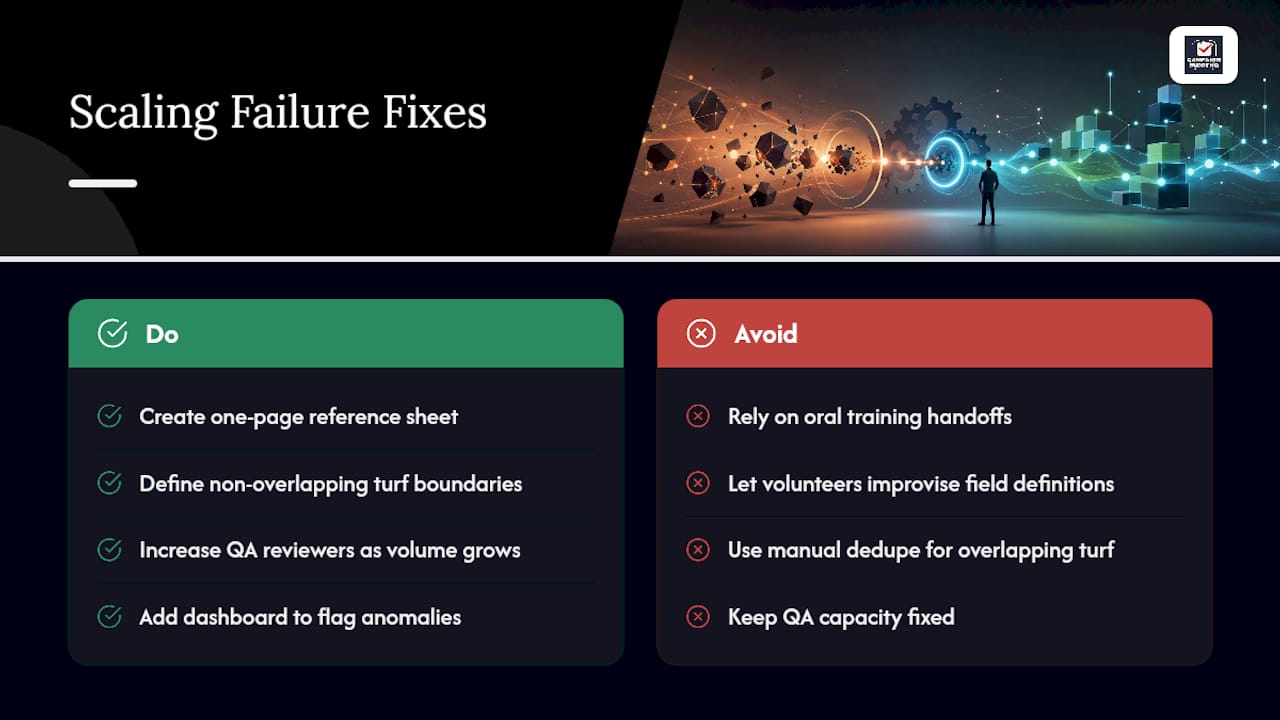
Training is the first casualty of scale. A founder or campaign manager can personally walk five volunteers through the required fields in ten minutes. At fifty volunteers across multiple locations, that same explanation has to survive being passed through three layers of team leads, and something always gets lost. Build a one-page reference sheet before you scale, not after volunteers start improvising their own field definitions.
Turf management gets harder too. Larger campaigns run overlapping lists across neighborhoods, which multiplies the dedupe problem covered earlier. The fix isn't more manual checking; it's assigning turf boundaries that don't overlap in the first place, so the dedupe layer catches genuine data entry errors instead of drowning in legitimate overlap.
QA capacity has to scale with volunteer count, not stay fixed. One organizer can review Saturday's shift data for a small team in twenty minutes. That same organizer reviewing five times the volume needs either more reviewers or a dashboard that flags anomalies automatically instead of requiring a manual scan of every record.
What This Actually Comes Down to for Most Campaigns
The conventional advice, "capture everything, review it later," has it backward. Most campaigns collapse under too many fields and too little follow-up discipline, not the reverse. A ten-field form nobody finishes is worse than a six-field form everyone completes accurately.
If you take one thing from this, it's this: the follow-up SLA matters more than the elegance of your form design. A campaign with a mediocre template and a strict 24 to 48 hour follow-up habit outperforms a campaign with a beautiful dashboard and a two-week follow-up lag every single time. Speed to contact converts interested voters into volunteers and donors before that interest fades.
Prioritize the SLA first, the required fields second, and the dashboard last. Most teams build it in the opposite order, which is exactly why so many outreach programs generate impressive-looking data that nobody ever acts on in time to matter.
— Billy
Turn Your Outreach Logs Into Same-Day Action With Campaign Buddy HQ
Some platforms build the three pieces this workflow depends on directly into the platform: field logging templates with required fields, automatic sync with reminders so nothing sits offline overnight, and progress dashboards that surface reach rate and support mix without a manual export.
That means less time spent building a form from scratch and more time spent acting on what canvassers actually found at the door. Flags route straight into staff queues instead of getting buried in a spreadsheet, and follow-up tasks don't depend on someone remembering to create them. For rural or low-density turf where signal drops are routine, the sync-reminder approach solves the exact problem paper walk-sheets create.
Campaign Buddy HQ offers a free 7-day trial, no credit card required, so you can run it against a real shift before deciding whether it fits your team's process.
Sources
- How to Fill Out and Submit a Political Canvassing Debriefing Form - LegalClarity
- Chapter 33: Building a Voter Contact Dashboard (Python Lab) | Political Analytics
- Canvassing data: what to collect at the door | Ecanvasser
FAQ
What Fields Are Mandatory in an Outreach Log?
At minimum: household ID or address, contact outcome, support or disposition code, follow-up timing, safety or do-not-contact flags, canvasser ID, and an automatic timestamp.
How Fast Should Follow-Up Happen After a Contact?
Aim for a 24 to 48 hour follow-up SLA on any contact marked interested, since delayed follow-up sharply reduces conversion into volunteers or donors.
What's the Biggest Technical Hurdle in Building a Voter Contact Dashboard?
Matching and deduplication across the voter file, contact history, and CRM engagement data is the main technical challenge, usually solved with standardized voter IDs or probabilistic matching.
Do Digital Field Apps Replace Paper Walk-Sheets Entirely?
Not always. Many campaigns still rely on paper in low-connectivity areas, provided an organizer transcribes and validates those records before the shift ends.
Can a Platform Like Campaign Buddy HQ Handle This Whole Workflow?
Campaign Buddy HQ covers field logging templates, sync reminders, flag routing, and progress dashboards in one place, which removes most of the manual coordination smaller campaigns otherwise handle by hand.