

Start with a voter-file-first unified contact record, enforce standardized field names and dropdown outcomes, and commit to a follow-up SLA of about two days. That sequence matters because skipping any step compounds downstream: a missing voter ID means manual deduplication, free-text outcome fields mean unusable analysis, and slow follow-up means warm contacts go cold. Campaign data drives results only when the foundation is clean before the first shift.
Three things to do today:
- Data lead (Day 0): Pull your state voter file and map voter_id to every existing contact record. One hour of mapping prevents weeks of cleanup.
- Field ops (Day 0): Lock outcome fields to a dropdown in your field form. No free-text. This single change cuts post-shift QA by half.
- All staff (Day 1): Set a written follow-up SLA of about two days for any "Interested" or "Volunteer" contact outcome and assign a named owner to enforce it.
Key Takeaways
A voter-file-first approach with standardized fields, enforced dropdowns, and a a follow-up SLA of about two days is the single most effective foundation for campaign data collection.
| Point | Details |
|---|---|
| Voter file first | Map voter_id to every contact record before your first shift to prevent weeks of manual cleanup. |
| Enforce dropdowns | Lock outcome fields to approved values; free-text fields produce unusable analysis and inflate duplicate rates. |
| Dedupe before export | Keep duplicate rate at or below 3% using the voter_id-first join hierarchy before any VAN upload. |
| Automate follow-up | Trigger SMS and staff tasks within 24–48 hours of an "Interested" outcome; manual assignment fails at scale. |
| Campaignbuddyhq | Provides unified contact records, outreach logging, and VAN-ready exports in one platform with a 7-day free trial. |
Table of Contents
- What are the core campaign data collection tips for your field schema?
- How should field teams capture data consistently at the door and on calls?
- How do you join the voter file, contact history, and CRM without creating a mess?
- How do you build a prioritized contact list for persuasion, GOTV, and fundraising?
- What KPIs and SLAs should you track on your campaign data dashboard?
- What workflows turn captured data into follow-up within 48 hours?
- What does a 7-day launch sprint look like with owners and time estimates?
- What campaigns consistently get wrong about data (and what actually fixes it)
- Campaignbuddyhq gives you the unified record and workflows this article describes
- Sources
What are the core campaign data collection tips for your field schema?
Every field your team captures should map to a canonical name in your master record. The table below is a campaign-ready schema you can copy directly into your import template or CRM mapping doc.
Approved contact_outcome dropdown values: Strong Support, Lean Support, Undecided, Lean Oppose, Strong Oppose, Not Home, Moved, Wrong Number, Refused, Volunteer Interest, Donor Interest, Vote-by-Mail Requested.
Building a strong voter list means combining state voter files, vendor enrichments, public records, surveys, and past CRM interactions, then treating maintenance as continuous work rather than a one-time import.
How should field teams capture data consistently at the door and on calls?
Consistency at the point of capture is the cheapest form of data quality. Every fix you make in the field costs nothing. Every fix you make after export costs staff hours.
- Lock all outcome fields to dropdowns. Free-text kills analysis. "Soft yes," "maybe," and "seemed interested" are three ways to say the same thing and three separate buckets in your data.
- Require voter_id and household_id on every contact record. If your field app can't pre-populate from the voter file, flag the record for manual lookup before sync.
- Capture timezone at the device level. Calling windows vary by state, and phone-banking compliance requires timezone-aware records to avoid fines and blocked numbers.
- Log volunteer ID on every submission. You need to trace bad data back to its source for retraining.
- Record opt-outs immediately and centrally. A STOP reply on text or a "do not contact" at the door must hit the suppression list before the next shift, not after.
- Run end-of-shift QA. Volunteers should mark wrong numbers, moved contacts, and opt-outs before logging off. Five minutes at shift end prevents an hour of cleanup the next morning.
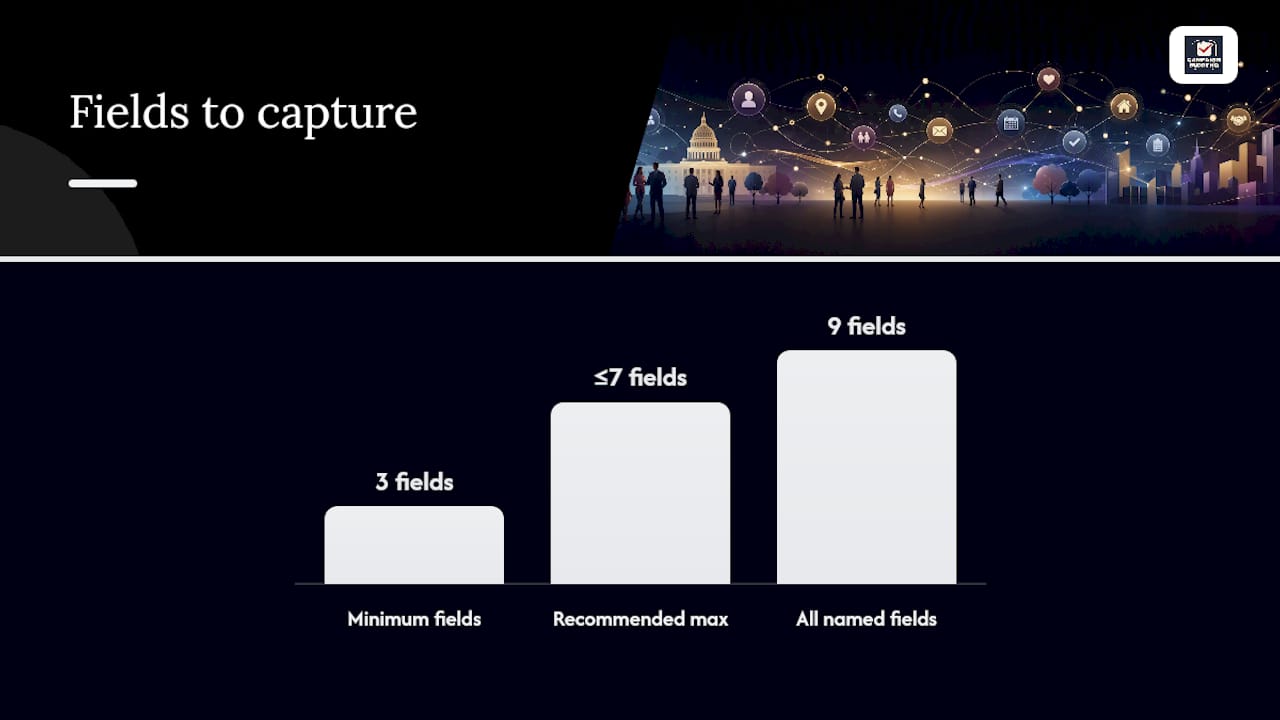
Pro Tip: Keep your field form to seven fields or fewer for volunteers. Every additional required field drops completion rates. Capture voter_id, outcome, and notes. Everything else can be enriched from the voter file later.
Consent records for calls and texts must include who consented, when, and through what channel. Store these centrally alongside your suppression list, not in a volunteer's spreadsheet.
How do you join the voter file, contact history, and CRM without creating a mess?
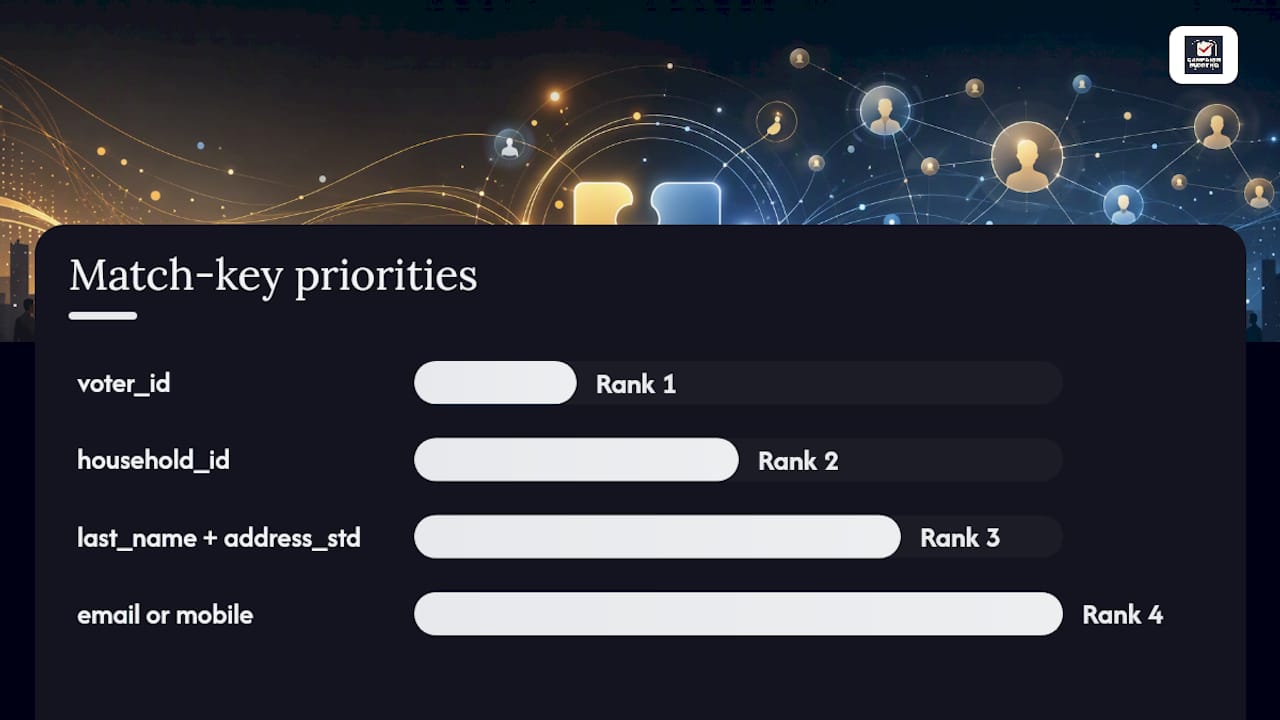
Use a voter-file-first approach: deterministic joins on voter_id where available, then probabilistic matching for everything else. This order matters because voter_id is the only field that is authoritative, stable, and shared across state systems.
The ODA voter data integration framework standardized voter IDs, field names, and encoding across datasets, turning what had been a repeated three-week manual cleaning task into a reusable pipeline. The practical payoff was weeks of analyst time recovered per election cycle.
Join key hierarchy and fallback strategy:
| Priority | Match Key | Use When | Threshold |
|---|---|---|---|
| 1 | voter_id | Available in both records | Exact match only |
| 2 | household_id | voter_id missing | Exact match + name confirmation |
| 3 | last_name + address_std | household_id missing | Fuzzy matching с высоким уровнем сходства |
| 4 | email or mobile | Address unavailable | Exact match; flag for review |
Any record that doesn't clear the threshold at any level goes to a manual review queue. Never auto-merge on email alone; email addresses change and are shared across households.
Pro Tip: Before any bulk merge, sample 50–100 matched pairs manually and check them. Fix the threshold before you run the full job.
How do you build a prioritized contact list for persuasion, GOTV, and fundraising?
Lead with persuadability. A contact who is genuinely movable is worth more than a strong supporter who will vote regardless. The scoring formula that produces operationally useful ranked lists weights components as follows, per the Political Analytics voter contact dashboard framework:
priority_score = (persuadability_score * 0.50)
              + (support_score_midrange_boost * 0.30)
              + (vote_likelihood * 0.15)
              + (geography_boost * 0.05)

# support_score_midrange_boost: highest for scores 2–4 (persuadable range)
# geography_boost: 1 if in target precinct, 0 otherwise
# If persuadability_score is null: substitute 2.5 (neutral default)
# If contact has returned early ballot: set priority_score = 0, suppress from list
Export checklist before any VAN upload:
- Required fields present: voter_id, first_name, last_name, address_std, city, state, zip5, mobile or email
- Suppression rules applied: opt-outs removed, early voters removed, wrong numbers removed
- File encoding: UTF-8, no BOM
- Format: CSV with headers matching VAN field map exactly
- Pre-upload QA: spot-check 20 rows for encoding issues and blank required fields
Measuring persuadability lift tells you whether your targeting is working. Compare support-score movement between your prioritized contact universe and a holdout group after two weeks of contact.
What KPIs and SLAs should you track on your campaign data dashboard?
Track five numbers weekly. Everything else is noise until these are green.
| KPI | Formula | Owner | Weekly Target |
|---|---|---|---|
| Duplicate rate | Duplicate records / total records | Data lead | ≤ 3% |
| Follow-up SLA | % of "Interested" contacts followed up within 48h | Field ops | Высокий процент соответствия |
| Reach rate | Completed contacts / attempts | Field ops | Умеренный процент соответствия |
| Address completeness | Records with valid address_std / total | Data lead | Очень высокий процент соответствия |
| Volunteer pipeline conversion | Sign-ups → completed first shift | Volunteer coordinator | Track weekly trend |
GOTV programs depend on a single shared contact record across channels so teams can mark who has already voted in real time. Without that, you're calling people who voted three days ago.
Benchmark to post on your dashboard: A a high duplicate rate before your first major contact push is a signal to pause list exports and run a dedupe pass. At that rate, staff are contacting the same person multiple times and logging conflicting outcomes.
Visualize reach rate as a weekly trend line by turf, not a campaign-wide average.
What workflows turn captured data into follow-up within 48 hours?
Automate the trigger the moment a "Volunteer Interest" or "Interested" outcome is logged. Manual task assignment at that point fails at scale.
- Enrollment trigger: Contact outcome = Volunteer Interest OR Interested
- Immediate action: Send thank-you SMS or email within 15 minutes of logging
- Staff task created: Assign follow-up call to field organizer; due within 24 hours
- Nurture enrollment: Add to appropriate list (volunteer pipeline or supporter nurture)
- Voted flag: When a contact marks as voted, remove from all active GOTV lists in real time
Workflow testing checklist (run before launch):
- Data lead: confirm trigger fires on correct outcome values only
- Field ops: submit a test contact record and verify task appears in organizer queue
- Comms: confirm SMS/email sends within 15 minutes and uses correct sender ID
- Volunteer coordinator: verify new volunteer records appear in onboarding sequence
Pro Tip: Limit volunteer access to the fields they need: name, address, outcome dropdown, and notes. They should never see support scores, donor amounts, or other contacts' phone numbers. Tighter permissions mean fewer accidental edits and lower compliance risk.
What does a 7-day launch sprint look like with owners and time estimates?
Sprint goal: One unified contact record and one VAN-ready export by Day 6.
- Day 0 (Data lead, 3h): Import voter file, map voter_id to existing contacts, run first dedupe pass.
- Day 1 (Data lead, 2h): Complete dedupe, flag manual review queue, set address normalization rules.
- Day 2 (Field ops, 2h): Roll out field form with locked dropdowns and required voter_id field to all volunteers.
- Day 3 (Data lead + Comms, 2h): Test automation triggers: submit test outcomes, verify SMS fires, confirm staff tasks appear.
- Day 4 (Field ops, 4h): Run a single pilot turf. Capture real contact data, sync, and check for encoding or mapping errors.
- Day 5 (Data lead, 2h): Export pilot turf to VAN format, run pre-upload QA checklist, upload and verify record count.
- Day 6 (All leads, 1h): Review KPI dashboard: duplicate rate, reach rate, SLA compliance. Adjust and scale.
Quick wins that unblock everything else: household_id in the import, a required outcome dropdown in the field form, and a successful test VAN upload. Hit those three and the rest of the sprint follows.
What campaigns consistently get wrong about data (and what actually fixes it)
Most campaigns don't fail on strategy. They fail on joins. The field team uses one system, finance uses another, and nobody mapped the voter_id between them. By the time someone tries to analyze contact history against donor records, the same person appears as four different contacts with four different outcomes.
The ODA framework's core lesson is unglamorous: standardize field names and encoding before you touch the data, not after. That single discipline turned a repeated three-week cleaning task into a reusable pipeline. The time savings compound across every subsequent analysis.
One practical note for leaders rolling this out with volunteers: start with one turf, not the whole campaign. A small pilot surfaces integration gaps in hours rather than discovering them mid-GOTV. Iterate on the field form, the sync rules, and the automation triggers before you scale. The campaigns that skip the pilot spend the last two weeks before Election Day cleaning data instead of contacting voters.
Campaignbuddyhq gives you the unified record and workflows this article describes
Campaignbuddyhq is built for exactly the operational prescription above: a unified contact record with built-in outreach logging, locked dropdown outcomes, supporter tracking, and export-ready lists, all in one place without stitching together three separate tools.
Features that map directly to this article's checklist:
- Daily and weekly planning tied to your contact universe, so organizers know who to call and when
- Outreach logging for doors, calls, texts, and events with standardized outcome fields
- Supporter tracking with progress visualization toward campaign goals
- VAN-friendly export templates and campaign phase management for GOTV and persuasion pushes
- Workflows for rural and low-density communities where turf efficiency matters most
The 7-day free trial requires no credit card. Start your free trial at Campaignbuddyhq and have a working contact record and your first export ready before the week is out.
Sources
- Chapter 33: Building a Voter Contact Dashboard (Python Lab) | Political Analytics
- How To Build A Voter List For Your Election Campaign