

A campaign workflow is a standardized, repeatable sequence of tasks, approvals, and checkpoints that moves a political campaign from initial strategy through execution and post-campaign review. Explaining campaign workflows matters because disorganized outreach is the single most common reason campaigns miss voter contact goals. When your team operates without defined processes, you get duplicated work, broken data, and missed deadlines. The fix is not more people. It is a documented workflow that every organizer follows, every time. Tools like Campaignbuddyhq are built specifically to support this kind of structured, repeatable execution for political teams.
What are the core stages of an effective political campaign workflow?
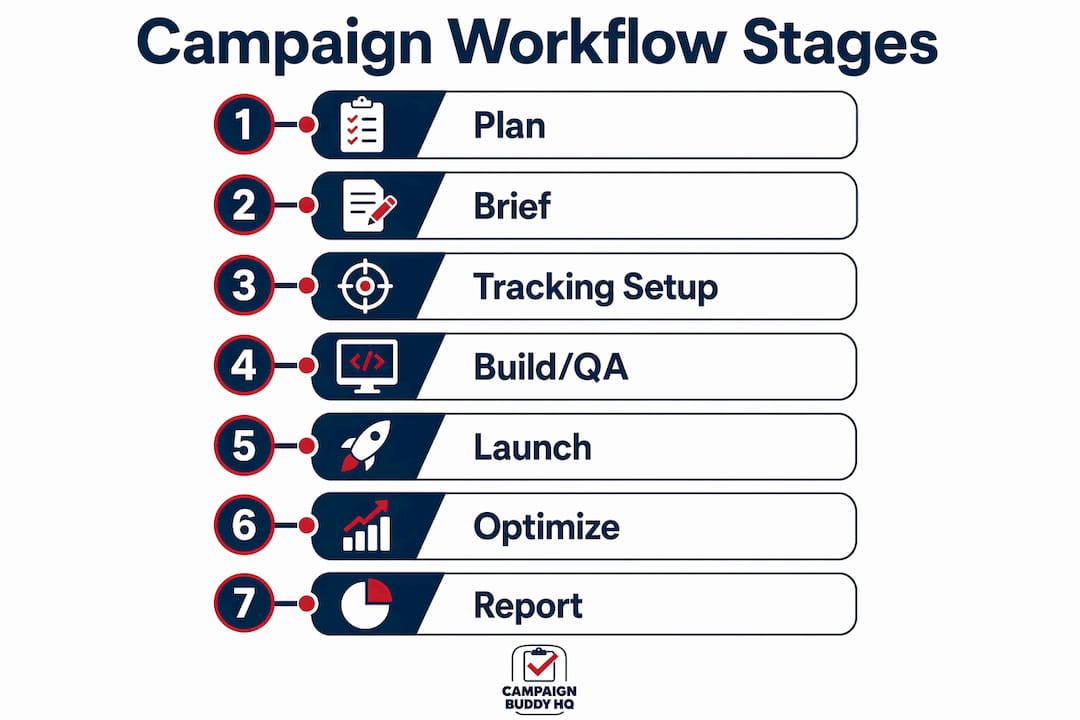
The 7-stage campaign management process is the most reliable framework for managing multi-channel political outreach. Each stage builds on the last, and skipping any one of them creates problems that compound downstream.
- Plan. Define your campaign goal, target audience, channels, and timeline. This is where you set measurable targets, such as doors knocked, calls made, or registrations completed.
- Brief. Document the strategy in a written brief that every team member and volunteer can reference. The brief locks in scope before production begins.
- Tracking setup. Configure UTM parameters, outreach logs, and data capture systems before any asset is created. This sequencing is non-negotiable.
- Build and QA. Create scripts, mailers, digital ads, or canvassing materials. Run quality checks against the brief before anything goes live.
- Launch. Execute outreach across your chosen channels, whether doors, calls, texts, or digital ads.
- Optimize. Review real-time data and adjust messaging, targeting, or channel mix based on what the numbers show.
- Retrospective. Conduct a structured post-campaign review to document what worked, what failed, and what the next campaign should do differently.
Timing matters as much as sequence. Campaign launch workflows typically take 2 to 4 weeks, email outreach cycles run 3 to 7 days, and paid digital ads require 2 to 5 days of setup. Missing these windows delays launch and compresses the time available for optimization.
Pro Tip: Set up your tracking and UTM naming conventions at stage three, before a single piece of content is built. Campaigns that skip this step and tag links after the fact see data fragmentation that makes attribution nearly impossible to untangle.

How do campaign workflows differ from projects, and why does standardization matter?
A project is finite. It has a start date, an end date, and a defined deliverable. A campaign workflow is repeatable. It is the process your team runs every time you launch a new outreach push, regardless of the specific candidate or issue. Understanding this distinction changes how you build your operations.
The most damaging problem in political campaign management is scope creep, and it almost always starts at intake. Without explicit intake gates requiring approved briefs and confirmed budgets before production begins, unauthorized additions repeatedly drain resources and derail timelines. A volunteer coordinator adds three new canvassing zones two days before launch. A digital staffer requests a last-minute landing page. Each addition seems small. Together, they collapse your timeline.
Three foundations prevent this from happening:
- Clear decision ownership. Name one directly responsible individual per workflow stage. Assigning a single DRI per stage eliminates the ambiguity that causes tasks to be overlooked or duplicated across multi-team environments.
- Defined campaign boundaries. Lock scope at the brief stage. Any addition after that requires a formal change request with a timeline and budget impact assessment.
- A forced review pause. Require owner sign-off before execution starts. This single checkpoint catches more errors than any QA process applied after the fact.
"The biggest improvements in campaign delivery come from standardizing workflows rather than rigid micromanagement." — Teamwork
Templates and approval checkpoints are the operational tools that make standardization real. Pre-built task lists and milestones integrated into reusable templates accelerate campaign setup and maintain quality across every outreach cycle, even when your team changes between elections.
What are the most common types of campaign workflows for political outreach?
A complete list of campaign workflows for a political operation covers seven core process types. Each has a defined owner, a typical duration, and a common failure point.
| Workflow type | Typical owner | Duration | Common failure point |
|---|---|---|---|
| Campaign launch | Campaign manager | 2 to 4 weeks | Missing brief or undefined success metrics |
| Content production | Communications director | 1 to 3 weeks | No approval gate before distribution |
| Email outreach | Digital organizer | 3 to 7 days | Suppression list not applied before send |
| Paid ads approval | Digital director | 2 to 5 days | UTM tags added after build, not before |
| Social publishing | Communications staff | 1 to 3 days | No review checkpoint for compliance |
| Lead routing | Field director | Same day | No defined handoff protocol between teams |
| Reporting and optimization | Data director | Weekly | No standardized reporting template |
These workflows do not operate in isolation. A campaign launch workflow triggers the content production workflow, which feeds the email outreach and paid ads workflows simultaneously. Your campaign outreach steps only produce reliable data when each workflow feeds clean, consistently tagged information into the next.
Pro Tip: Build your lead routing workflow before your launch workflow. If you do not have a defined protocol for what happens when a supporter responds, you will lose contacts in the gap between field teams and your data system.
What campaign workflow best practices boost efficiency and data quality?
The most preventable data quality problem in political campaigns is UTM and naming drift. Mandating naming conventions at the start of every campaign prevents the downstream errors that make your analytics unreliable and your reporting meaningless. One organizer labels a canvassing event "GOTV_2026" while another uses "gotv-fall" and a third uses "GetOutTheVote." Three names, one campaign, zero usable aggregate data.
Effective campaign workflow techniques that consistently produce better outreach outcomes include:
- Enforce tracking before build. Skipping UTM tagging or applying it after campaign build causes up to 23% link errors, leading to broken attribution data. Set your naming conventions and tracking parameters at stage three, not stage five.
- Assign single ownership per stage. Every workflow stage needs one person who is accountable for completion and quality. Shared ownership is no ownership.
- Build reusable templates. Templates are not shortcuts. They are the mechanism by which your team applies lessons from past campaigns to future ones without starting from scratch every cycle.
- Require approval gates. No asset moves from build to launch without a documented sign-off. This applies to email sends, canvassing scripts, digital ads, and social content equally.
- Run structured retrospectives. Post-campaign reviews identify what worked and what failed, and the findings should update your templates and checklists before the next campaign begins.
Your campaign tracking setup is the foundation that makes every other best practice meaningful. Without reliable data flowing in, optimization is guesswork.
How does workflow automation accelerate campaign execution and reduce errors?
Workflow automation in political campaigns is not about replacing organizers. It is about redesigning how work moves through your operation to reduce bottlenecks and increase the volume of quality outreach your team can execute. Automation transforms chaotic multi-channel campaigns into consistent, data-driven operations rather than hit-or-miss efforts.
The measurable impact is significant. Structured intake, enforceable SLAs, reusable templates, and automated QA gates reduce campaign build time by 40 to 60% and cut error rates by over 50%. For a field team running weekly canvassing cycles, that compression means more doors knocked per organizer hour, not fewer.
Four automation patterns deliver the most value for political campaign teams:
- Intake standardization. Automate the collection of briefs, budgets, and success metrics at campaign intake so no campaign starts without complete information.
- Program templates and tokenization. Build master templates with variable fields for candidate name, district, and date so your team configures rather than rebuilds each cycle.
- Automated QA gates. Set up link validation, proof send requirements, and suppression logic checks that run automatically before any outreach goes live.
- SLA enforcement. Automate deadline reminders and escalation alerts so stage owners know when they are approaching or past their window without a manager having to chase them.
Governance matters as much as the automation itself. Workflows require regular iteration. Schedule a quarterly review of your automation rules, template logic, and QA criteria to catch drift before it becomes a systemic problem. Nonprofits and political teams that apply digital outreach automation consistently report faster cycle times and fewer data errors than teams relying on manual coordination alone.
Key takeaways
A campaign workflow is only as strong as the intake gates, ownership assignments, and tracking protocols built into it from the start.
| Point | Details |
|---|---|
| Tracking before build | Set UTM parameters and naming conventions before creating any campaign asset to protect data integrity. |
| Seven-stage framework | Plan, Brief, Tracking Setup, Build/QA, Launch, Optimize, and Retrospective form the repeatable loop every campaign needs. |
| Single stage ownership | Assign one directly responsible individual per workflow stage to eliminate duplication and missed tasks. |
| Intake gates prevent scope creep | Require approved briefs and confirmed budgets before production starts to protect timelines and resources. |
| Automation multiplies output | Reusable templates and automated QA gates reduce build time by 40 to 60% without adding headcount. |
Why I think most campaigns underinvest in workflow design
Most campaign teams I have worked with treat workflow design as an administrative task. They build the strategy, hire the staff, and assume the process will sort itself out. It never does. The campaigns that consistently hit their voter contact goals are not the ones with the biggest budgets. They are the ones where every organizer knows exactly what step they own, what data they are responsible for capturing, and what the handoff looks like to the next person.
The hardest lesson I have learned is that flexibility and standardization are not opposites. You can build a workflow that adapts to a rural canvassing district or a last-minute issue campaign without throwing out the template. The template is what makes adaptation fast. Without it, every change requires rebuilding from zero under pressure.
Retrospectives are the most underused tool in political campaign management. Teams run a campaign, move immediately to the next one, and carry the same errors forward. A 90-minute structured review after each campaign cycle, documented and fed back into your templates, compounds into a significant operational advantage over multiple election cycles. Your campaign phase management improves with every cycle only if you capture what you learned.
Start with ownership and tracking. Get those two things right before you automate anything else.
— Billy
How Campaignbuddyhq puts these workflows into practice
If you are ready to move from ad hoc coordination to a structured campaign operation, Campaignbuddyhq is built for exactly this.
Campaignbuddyhq gives political teams and issue advocacy organizers a purpose-built platform for managing outreach workflows from intake to retrospective. You get standardized daily and weekly planning, outreach logging for doors, calls, texts, and registrations, supporter tracking, and campaign phase management. Every feature is designed around the workflow principles covered in this article, including tracking setup before build and single-stage ownership. The platform works for grassroots teams in rural districts and high-volume urban campaigns alike. Start your free 7-day trial at Campaignbuddyhq with no credit card required and see how a structured workflow changes your outreach results.
FAQ
What is a campaign workflow in political organizing?
A campaign workflow is a standardized, repeatable sequence of tasks and approvals that guides a political campaign from strategy through execution and review. It defines who owns each stage, what inputs are required, and what must be completed before the next stage begins.
How many stages does a standard campaign workflow have?
The standard campaign management process has seven stages: Plan, Brief, Tracking Setup, Build/QA, Launch, Optimize, and Retrospective. Each stage has a defined owner and a completion checkpoint before the next stage starts.
Why does tracking setup come before building campaign assets?
Setting up UTM parameters and naming conventions before asset creation prevents data fragmentation and broken attribution. Campaigns that apply tracking after the build phase see up to 23% link errors that make outreach performance data unreliable.
What is the difference between a campaign workflow and a campaign project?
A project is a one-time effort with a fixed end date. A campaign workflow is a repeatable process your team runs for every outreach cycle. Workflows use templates and approval gates to maintain consistency across campaigns without rebuilding from scratch each time.
How does workflow automation help political campaign teams?
Workflow automation reduces campaign build time by 40 to 60% and cuts error rates by over 50% through structured intake, reusable templates, and automated QA gates. This allows field teams to run higher volumes of outreach without increasing staff.