

Campaign progress monitoring is defined as the continuous tracking of Key Performance Indicators (KPIs) and metrics to evaluate and adjust campaign effectiveness in real time. For political and advocacy campaign managers, this process separates campaigns that adapt and win from those that run blind until election day. Knowing how to monitor campaign progress means using tools like Google Analytics, Meta Ads Manager, and Campaignbuddyhq alongside metrics like click-through rate (CTR), conversion rate, and return on investment (ROI) to catch problems early and act before your budget runs out. This guide walks you through the exact metrics, tools, and processes you need.
What key metrics should campaign managers track?
Campaign monitoring metrics include CTR, open rate, conversion rate, engagement rate, ROI, close rate, and impression share. Each one tells a different part of the story. CTR shows whether your message is compelling enough to get a click. Conversion rate tells you whether those clicks are turning into real actions, like petition signatures, donations, or volunteer sign-ups.
Here is a quick reference for the metrics that matter most in advocacy and political campaigns:
| Metric | Definition | Why It Matters for Advocacy |
|---|---|---|
| Click-Through Rate (CTR) | Clicks divided by impressions | Measures message resonance with your audience |
| Conversion Rate | Actions divided by total visitors | Tracks whether outreach drives real commitments |
| Open Rate | Emails opened divided by emails sent | Signals subject line and sender credibility |
| Engagement Rate | Interactions divided by reach | Shows how deeply content connects with supporters |
| Return on Investment (ROI) | Net gain divided by cost | Evaluates overall campaign efficiency |
| Impression Share | Your impressions vs. total available | Reveals how much of the audience you are reaching |
Setting benchmarks matters as much as tracking the numbers. Benchmarks must reflect achievable targets to provide meaningful signals. Seeing a 2.8x return on ad spend looks fine in isolation, but it signals a problem if your target was 3.5x. Without that context, you are just watching numbers move.
Pro Tip: For advocacy campaigns, conversion rate is often more telling than CTR. A voter registration drive with a 0.5% CTR but a 40% conversion rate is outperforming one with a 3% CTR and a 10% conversion rate every time.
Which tools best support political and advocacy campaign tracking?
The right tools determine how quickly you can spot problems and act. Google Analytics tracks web traffic and goal completions. Meta Ads Manager gives you real-time data on paid social performance. Campaignbuddyhq is purpose-built for political and advocacy teams, covering outreach logging, supporter tracking, and daily planning in one place.

Centralizing campaign data into one dashboard reduces time lost to context switching and keeps your team focused on what matters. Many campaign teams waste hours each week toggling between fragmented platforms. That time adds up across a multi-month campaign.
Here is how common tools compare for advocacy and political use:
| Tool | Best For | Cost | Advocacy Suitability |
|---|---|---|---|
| Google Analytics | Web traffic and goal tracking | Free | Moderate |
| Meta Ads Manager | Paid social campaign data | Free (ad spend required) | High |
| Campaignbuddyhq | Outreach, doors, calls, supporter tracking | Monthly subscription | Very High |
| CRM platforms | Donor and volunteer relationship management | Varies | High |
For email-based outreach, email marketing platforms for nonprofits offer built-in reporting on open rates, click rates, and list health that integrates well with broader campaign dashboards.
Pro Tip: Connect your outreach tool to your CRM so every door knock, call, and text is logged automatically. Manual entry is where data quality breaks down on busy campaign days.
Automated reporting and alerting allow campaign managers to detect anomalies quickly and act before a small problem becomes a budget drain. Scheduling recurring reports removes the burden of remembering to check and creates a consistent record of campaign health over time.
How to build a consistent process to track and optimize performance
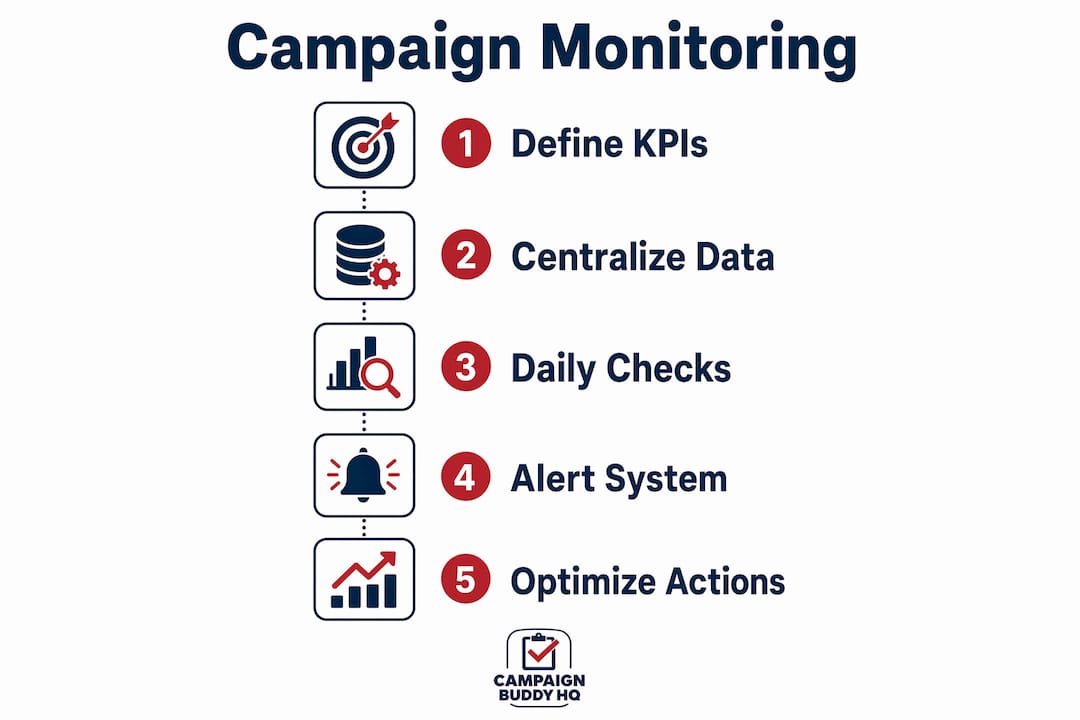
A reliable monitoring process starts before your campaign launches. Set your goals and KPIs upfront so every metric you track has a purpose. Without predefined targets, you are collecting data without knowing what good looks like. Use the campaign goal setting framework to anchor your metrics to real outcomes.
Follow this process to build a monitoring cadence that works under campaign pressure:
- Define your KPIs before launch. Tie each metric to a specific campaign goal, such as 500 voter registrations or 1,000 petition signatures.
- Build a centralized dashboard. Pull data from all active channels into one view so your team sees the full picture without switching tools.
- Run daily pulse checks. Daily monitoring catches critical failures like payment issues or budget spikes early. Keep these checks short and focused on red flags, not deep analysis.
- Set tiered alerts. Use percentage-based thresholds. A tiered alert system uses yellow flags for metrics 15% under target and high-priority alerts for metrics 50% under target or sudden spend spikes.
- Reserve weekly sessions for optimization. Deep analysis and strategic changes belong in a weekly review, not a daily check.
- Make one change at a time. Changing multiple variables at once makes it impossible to know what actually moved the needle.
"Monitoring tells you what is happening now, allowing data-driven interventions before a campaign's budget runs out." AgencyAnalytics
This distinction between monitoring and reporting is critical. Reporting confirms what happened. Monitoring lets you intervene while there is still time to change the outcome. For a campaign with a fixed end date, that difference is everything.
Pro Tip: Use a rolling 24-hour data window for daily checks rather than a calendar-day view. It smooths out time-zone gaps and gives you a cleaner read on whether performance is trending up or down.
How to troubleshoot and refine your monitoring for better outreach impact
Even a well-built monitoring system will surface problems you did not anticipate. The goal is to catch them fast and respond without overreacting. Common anomalies include sudden cost spikes, a tracking pixel that stops firing, or an email list segment with a 0% open rate. Each of these has a specific fix, but you need to see them first.
Early campaign data is noisy. Allow a campaign a few days and a meaningful number of conversions before drawing conclusions. Reacting to day-one data is one of the most common and costly mistakes in campaign management. A political ad that looks like it is underperforming on day one may simply need 48 hours to exit the learning phase.
Use these practices to refine your monitoring over time:
- Segment your data. Breaking down performance by audience, channel, device, or creative reveals what is actually driving results. A statewide canvassing campaign might show strong conversion in urban precincts and weak results in rural areas, pointing to a resource reallocation opportunity.
- Run A/B tests on creative elements. Test one variable at a time, whether that is a subject line, a call-to-action button, or an ad image. Let each test run long enough to reach statistical significance before acting.
- Pause underperformers with clear criteria. Set a threshold in advance, such as pausing any ad with a CTR below 0.3% after 1,000 impressions, so the decision is data-driven rather than emotional.
- Reallocate budget toward what works. When one channel or message is outperforming, shift resources toward it rather than waiting for the weaker channel to catch up.
For advocacy campaigns tracking fundraising progress, segmenting donor behavior by channel and gift size often reveals which outreach method is driving the highest-value supporters, not just the most supporters.
Pro Tip: When you spot a sudden performance drop, check your tracking setup before changing your creative or budget. A broken pixel or misconfigured UTM parameter is responsible for more "performance drops" than most managers realize.
Key takeaways
Effective campaign progress monitoring requires clear KPIs, centralized tools, a tiered alert system, and a disciplined cadence of daily checks paired with weekly optimization reviews.
| Point | Details |
|---|---|
| Define KPIs before launch | Tie every metric to a specific campaign goal so data has context and direction. |
| Centralize your data | Use one dashboard to reduce context switching and keep your team aligned on performance. |
| Daily checks, weekly changes | Run short daily pulse checks for red flags, but save optimization decisions for weekly reviews. |
| Use tiered alerts | Set percentage-based thresholds to catch real problems without drowning in noise. |
| Segment before you act | Break data down by channel, audience, and creative before making any budget or strategy change. |
What i have learned from monitoring campaigns in the field
Most campaign managers I have worked with make the same mistake. They check their numbers every morning and feel the urge to fix something. That urge is the enemy of good data. The first few days of a campaign are almost always misleading. Costs look high, conversions look low, and the instinct is to pull the plug on something that just needs time to find its audience.
The discipline that actually moves campaigns forward is separating observation from action. Daily monitoring is a health check, not a strategy session. I have seen teams burn through creative variations in week one because they panicked at noisy early data, only to run out of tested assets by week three when the campaign was actually gaining traction.
The other habit that consistently separates effective campaign teams from reactive ones is centralizing their data. When your outreach logs, ad performance, and email metrics live in three different places, you spend your mental energy on logistics instead of strategy. Platforms like Campaignbuddyhq exist specifically to solve this for political and advocacy teams. The campaign tracking basics are not complicated. The hard part is building the discipline to follow them consistently under pressure.
Set your benchmarks before you launch. Check daily for failures. Optimize weekly with one change at a time. That process sounds simple because it is. The campaigns that follow it consistently outperform the ones that improvise.
— Billy
Put your campaign monitoring on autopilot with Campaignbuddyhq
Knowing how to assess campaign results is one thing. Having a system that makes it automatic is another.
Campaignbuddyhq is built for exactly the kind of work you are doing. It logs doors knocked, calls made, texts sent, and registrations completed in one place. You get daily and weekly planning tools, outreach tracking, supporter management, and campaign phase tracking without stitching together multiple platforms. For political campaigns and advocacy groups that need to move fast and stay organized, it is the monitoring layer that keeps your whole operation visible. Start your free 7-day trial with no credit card required and see how much clearer your campaign picture becomes when everything is in one place.
FAQ
What is campaign progress monitoring?
Campaign progress monitoring is the ongoing process of tracking KPIs and metrics to evaluate whether a campaign is meeting its goals in real time. It differs from reporting in that it enables active intervention before a campaign's budget or timeline runs out.
How often should i check campaign metrics?
Check metrics daily for critical failures like budget spikes or tracking errors, but limit optimization decisions to weekly reviews. Daily checks should take minutes, not hours.
Which metrics matter most for advocacy campaigns?
Conversion rate, CTR, and engagement rate are the most telling metrics for advocacy work. Conversion rate in particular shows whether outreach is producing real commitments like sign-ups, donations, or volunteer registrations.
How do i avoid overreacting to early campaign data?
Allow at least a few days and a meaningful number of conversions before judging results. Early data is noisy and rarely reflects true campaign performance, especially in the first 24–48 hours after launch.
What is the best tool for political campaign monitoring?
Campaignbuddyhq is purpose-built for political and advocacy teams, covering outreach logging, supporter tracking, and progress monitoring in one platform. Google Analytics and Meta Ads Manager complement it for web and paid social data.