

A campaign calendar is the master schedule that turns a candidate's strategy into daily, trackable actions. Its one job is to keep staff and volunteers hitting contact and turnout targets on time, every week, until the polls close. Campaign Buddy HQ and calendar frameworks like the Campaign Calendar Guide both build from the same principle: everything works backward from Election Day.
TL;DR:
- Campaign calendars must integrate legal deadlines, phase goals, production schedules, and volunteer management to ensure timely, trackable actions.
- Building the timeline backward from votes to win requires calculating contact goals, setting phase windows, and scheduling checkpoints to adapt targets.
- Daily and weekly volunteer shifts should be realistic, with designated owners, backup plans, and clearly scheduled candidate call times as fixed priorities.
- Adaptations for rural districts include adding drive-time buffers, routing geographically, and using analog outreach methods to account for lower contact rates.
- A unified digital platform streamlines planning, logging, and supporter management, preventing disorganization as volunteer numbers grow and campaign complexity increases.
Table of Contents
- What Should a Campaign Calendar Planning Checklist Include?
- How Do You Build the Timeline Backward From Election Day?
- How Should You Structure Daily and Weekly Volunteer Shifts?
- What Rural and Low-Density Adaptations Belong on the Calendar?
- How Do You Track and Log Outreach Consistently?
- What Should Every Calendar Entry Capture, and Who Should Edit It?
- Billy's Take: The Habits That Keep a Calendar Alive
- Put Your Campaign Calendar on One Shared System
- Sources
What Should a Campaign Calendar Planning Checklist Include?
A calendar that only lists events will let you down by October. It needs four layers working together: legal deadlines, phase goals, production dates, and people.
Start with the non-negotiables. Filing deadlines, campaign finance reports, and ballot certification dates go on first, because missing one can disqualify a candidacy or trigger a fine. The Campaign Calendar Guide recommends building the entire calendar backward from Election Day, plotting these fixed dates before anything else gets scheduled around them.
Next comes the phase structure: recruitment, voter identification, persuasion, and get-out-the-vote (GOTV), each with its own metric (volunteers signed, IDs collected, persuasion contacts made, ballots confirmed). Then layer in production dates: mailer print deadlines, earned media pitches, paid media buys, and event RSVPs. Finally, add the human layer: volunteer shifts, candidate call time, and training sessions.
A sample weekly entry looks like this:
Copy that structure into a shared spreadsheet or a dedicated planning tool, and you have the bones of the entire race — see how to do this in detail in how to plan a content calendar for marketing success. For the compliance side specifically, a campaign compliance checklist keeps filing dates from slipping through the cracks.
How Do You Build the Timeline Backward From Election Day?
Every field plan starts with one number: Votes to Win. Everything else on the calendar exists to hit that number.
- Calculate your Votes to Win figure using turnout models for the district, then divide it by your expected contact-to-vote conversion rate to get a total contact goal.
- Set the four phase windows. Recruitment typically runs first and overlaps with early identification. Persuasion picks up once you know your target universe, and GOTV takes over in the final two to three weeks.
- Convert the total contact goal into weekly targets, then divide those into daily shift goals for canvassers and callers.
- Place production and compliance deadlines inside the phases they support, so mailers land during persuasion, not after it.
- Build in lookback checkpoints, roughly every two weeks, to compare actual contacts against the target and reassign volunteers where the count is falling short.
The Campaign field plan guide walks through exactly this kind of conversion, turning a Votes-to-Win number into a weekly contact target with a realistic start date for field activity.
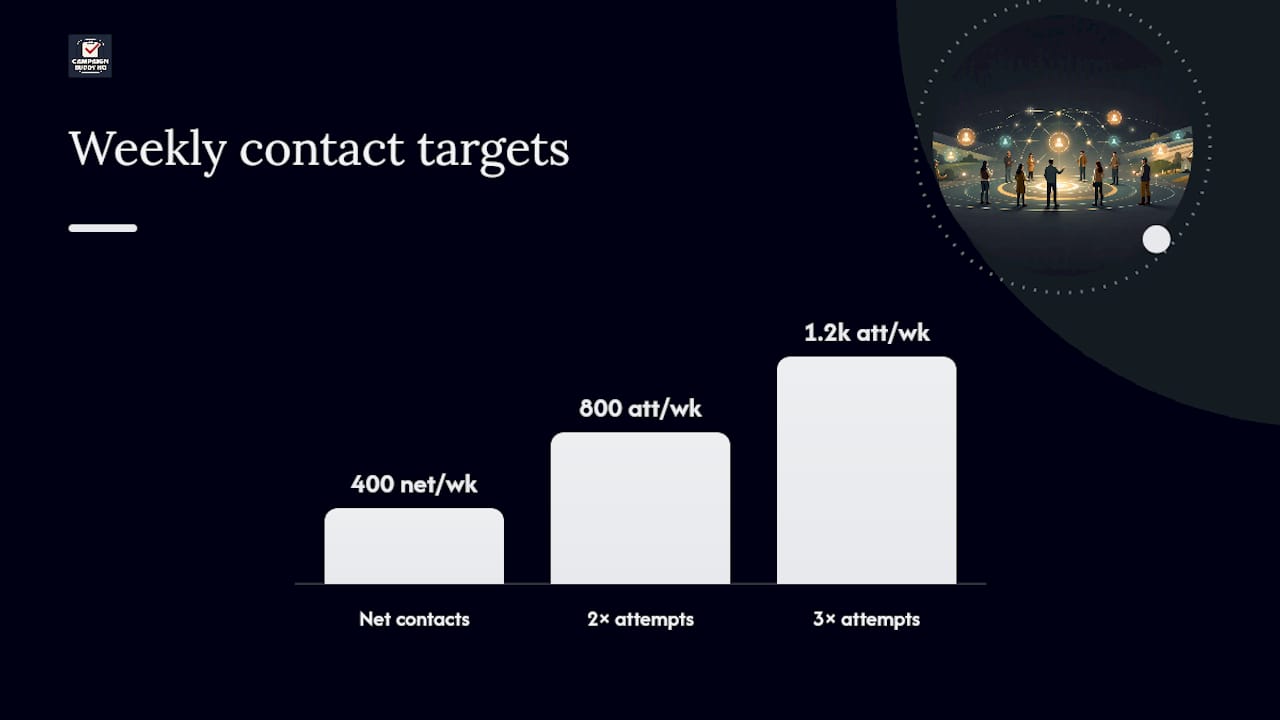
A useful benchmark: if your Votes-to-Win number is 8,000 and your field program has 20 weeks before Election Day, you need roughly 400 net contacts a week before accounting for no-answers and refusals. Most programs plan for two to three attempts per contact to hit that net figure, which is why the weekly target on paper always looks smaller than the number of dials or doors actually scheduled.
How Should You Structure Daily and Weekly Volunteer Shifts?
Daily targets only work if the shift structure behind them is realistic. A canvass shift of three hours with a reasonable per-hour door goal, adjusted for the actual walkability of the turf, beats an ambitious number nobody hits twice.
- Assign a shift owner who confirms attendance and closes out the data by end of day.
- Name a backup for every recurring shift so one absence doesn't cancel outreach.
- Put a data lead on the calendar separately from the field lead. Logging is its own job.
- Calendar candidate call time in fixed blocks, protected from scheduling creep, since candidate hours are the scarcest resource on any campaign.
- Hold a staff check-in at the same time each week, ideally right after the weekend's biggest push, to catch problems early.
The Campaign Calendar Guide specifically flags candidate availability and staff prep windows as calendar items, not afterthoughts.
Pro Tip: Block candidate call time before anything else goes on the calendar each week. Every other shift can flex around it; candidate hours cannot.
What Rural and Low-Density Adaptations Belong on the Calendar?
A calendar built for a dense urban district falls apart fast in a rural one. Drive time eats the hours a canvasser would otherwise spend at doors, and door-to-door contact rates don't hold the same way.
Survey research on campaign contact modes found leaflets were the most commonly reported form of outreach, telephone canvassing was relatively uncommon, and rurality had only a modest effect on overall contact rates, which argues for a wider mix of channels rather than doubling down on knocking alone, according to research on contact modes and rurality.
- Add a drive-time buffer of up to 40% over map estimates when scheduling rural canvass routes.
- Cluster stops geographically and route around known fuel and pull-off points.
- Schedule recurring pop-up registration drives at feed stores, fairs, and churches on a fixed weekly slot.
- Use analog channels, post office bulletin boards, church newsletters, and yard sign drops, with a follow-up window logged a few days later.
- Block a data-processing slot each week specifically for paper forms and translation cards.
The Rural Roadmap Toolkit recommends a QR-code-with-paper-fallback process for exactly this reason: it keeps registration quality high even where connectivity is spotty.
How Do You Track and Log Outreach Consistently?
The calendar tells your team what to do. The log tells you whether it worked, and both need a fixed rhythm to be useful.
Daily logs should capture doors answered, calls connected, texts sent, and new registrations, entered the same day while the numbers are still fresh. Weekly dashboards roll that data up for the field director and campaign manager to review together, usually at the same recurring meeting each week.
- Log doors answered, calls connected, texts delivered, and registrations collected, every shift.
- Assign one dashboard owner who compiles the weekly numbers before the team meeting.
- Run short message tests, comparing two script variations for a week at a time, then keep the version with the better response.
- Track cost per valid registration alongside geographic coverage, a combination that mobile-drive case studies use to judge whether an outreach event was worth repeating.
| Metric | Logged by | Reviewed |
|---|---|---|
| Doors, calls, texts | Field/data lead | Daily |
| Registrations | Data lead | Daily |
| Weekly contact rate vs. target | Campaign manager | Weekly |
| Cost per valid registration | Finance/field lead | Weekly |
Compliance and finance milestones belong in the same system. A campaign reporting guide covers how to schedule those filings so they don't get buried under field data.
What Should Every Calendar Entry Capture, and Who Should Edit It?
Every entry on the shared calendar needs the same core fields: objective, owner, contact target, prep tasks, deliverable, and a follow-up date. Skip any one of these and the entry becomes a note instead of a plan.
- Restrict editing rights to leads and the campaign manager; open viewing to the full team.
- Give volunteer coordinators comment access so they can flag conflicts without rewriting the plan.
- Export a printable weekly view for volunteers who prefer paper over an app, especially in low-connectivity areas.
This is where a shared platform earns its keep. Campaign Buddy HQ maps directly onto daily and weekly planning, outreach logging, supporter tracking, and phase management, the same structure covered above, so a campaign isn't rebuilding this system in a spreadsheet from scratch. For more on converting outreach goals into a working schedule, see this step-by-step outreach guide.
Billy's Take: The Habits That Keep a Calendar Alive
A calendar dies the moment nobody updates it. Run a 15-minute daily standup to check yesterday's numbers against target, hold one weekly session to reset the coming week, and write down why decisions were made, not just what they were. In rural districts, hand recurring local events to trusted community leaders instead of managing them from headquarters. The research on collaborative approaches backs this up: over-centralized calendars tend to miss the local rhythms that actually drive turnout.
— Billy
Put Your Campaign Calendar on One Shared System
Every section above points to the same problem: a campaign calendar scattered across spreadsheets, group texts, and someone's notebook falls apart the moment volunteer numbers grow. This platform was built specifically for campaigns and advocacy groups that need daily and weekly planning, outreach logging, and supporter tracking to live in one place instead of multiple systems.
The platform maps directly onto the phase structure covered in this guide, recruitment, ID, persuasion, and GOTV, so contact targets and volunteer shifts stay tied to the same benchmarks your calendar already tracks. It also includes workflows designed for rural and low-density teams, such as route clustering and paper-form logging, so the calendar can better reflect how a campaign operates on the ground rather than relying on a generic template. If your team is still stitching together spreadsheets and text threads two months out from the filing deadline, that's the moment to fix it. Start the free 7-day trial, no credit card required, and get your calendar and outreach logs running in one system before your next canvass shift.