

Track door knocks with a GPS-enabled field app, standardized dispositions, and drawn territory boundaries so every knock is verified, timestamped, and routed to the right rep. This is a practical way to run that stack without building it yourself. Start with a short pilot, one squad, one to three days, before rolling it out to the full team.
TL;DR:
- Most door-knocking data should include GPS coordinates, timestamps, dispositions, and photos, which verify activity and prevent disputes.
- Effective software must offer live GPS with motion detection, offline capture, fast disposition templates, and route optimization to avoid common operational failures.
- Rolling out tracking in stages, starting with a small pilot, helps identify and fix issues like data gaps, territory overlaps, and poor entry habits before wider deployment.
- Key metrics for tracking success are doors per hour, conversion per knock, and territory completion percentage, with cohort analysis improving coaching insights.
- Prioritize quick-win data habits such as short dispositions and mandatory fields over fancy features, ensuring high data quality at the door level before investing in dashboards.
Table of Contents
- What Door Knocking Tracking Actually Records
- What To Require When Evaluating Tracking Software
- How Do You Roll Out Door Knocking Tracking Without Disrupting the Team?
- Which Metrics Actually Tell You If Tracking Is Working?
- Common Field Problems and Fast Fixes
- Campaign Buddy HQ's Practical Rollout Checklist
- Why Most Canvassing Programs Track the Wrong Things
- Start a Pilot Instead of Guessing
- Sources
- FAQ
What Door Knocking Tracking Actually Records
Door knocking tracking is the practice of logging where a rep went, what happened at the door, and when, then turning that log into a verifiable record instead of a memory. Most managers overestimate how much data they need and underestimate how much they need to trust it.
A useful record captures:
- GPS coordinates, tied to the exact address, not just a neighborhood.
- Timestamp, so you know how long a rep spent at each stop.
- Disposition, a short standardized outcome (not home, interested, refused, follow-up).
- Rep ID, so activity ties back to a specific person and shift.
- Notes, freeform context that a disposition code alone won't capture.
- Photos, when relevant and permitted, for proof of contact or condition.
The GPS coordinate paired with the timestamp does the real verification work. If a rep logs 40 doors in an hour but the location pings show them parked at a coffee shop, that's a coaching conversation, not a guess. Photos and timestamps together also cut down disputes about whether a door was actually knocked. One caveat worth building into your process from day one: ask for consent before photographing a resident or their property, and follow your organization's data policy on what gets stored and for how long.
What To Require When Evaluating Tracking Software
Most door-knocking apps look similar in a demo. The differences show up three weeks into a real canvass, usually during a dead-zone shift or a territory dispute. Before you commit to a tool, or decide to build a lightweight version internally, check for these five things.
- Live GPS with motion states. You want to see whether a rep is walking, driving, or stationary, plus a check-in verification at the door itself. Ecanvasser advertises this kind of real-time activity monitoring as a baseline feature for canvassing teams, which tells you it's become table stakes, not a premium add-on.
- Territory drawing with automated overlap prevention. Two reps knocking the same block on the same day wastes labor and annoys residents.
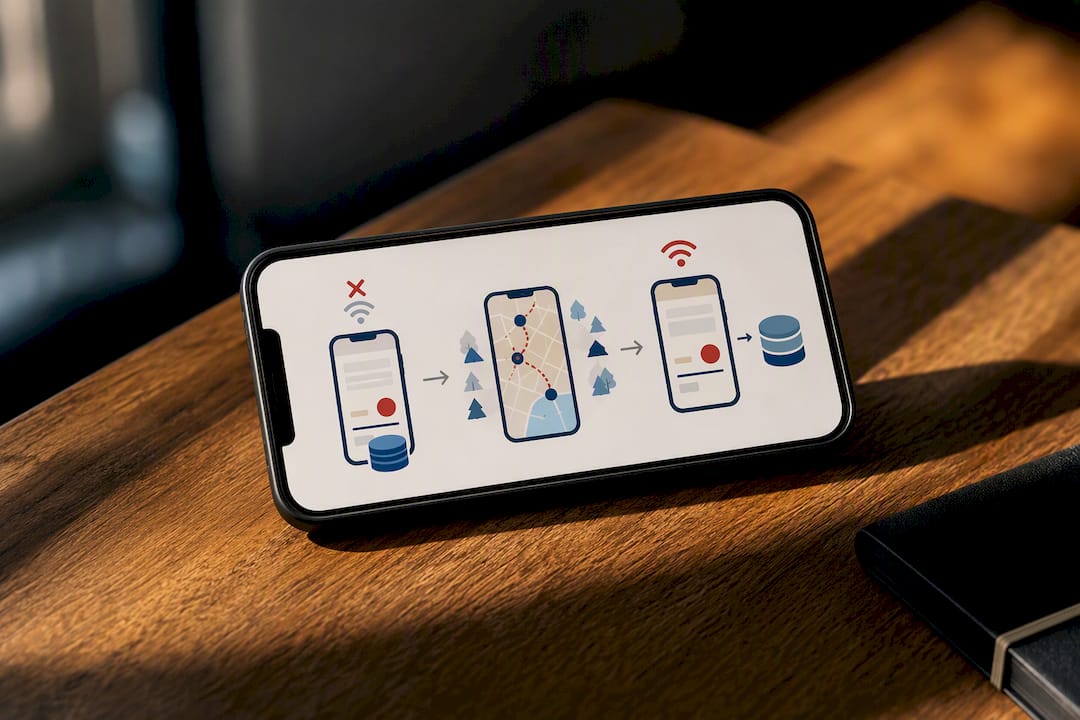
- Offline-first capture. The app needs to log knocks with no signal and sync later, not just display a spinning icon.
- Fast disposition templates. One-tap or two-tap entries, not a dropdown menu with 15 options.
- Route optimization, doors-per-hour reporting, CRM sync, and an admin dashboard. These turn raw knocks into something a manager can act on same-day.
Each of these maps to a specific failure mode. Skip territory drawing and you get overlap complaints. Skip offline capture and you lose entire shifts of data in rural coverage gaps. Skip fast dispositions and reps either skip logging altogether or slow down enough that doors-per-hour drops.
Pro Tip: Test any tool's offline mode by turning on airplane mode for 20 minutes during a demo. If the app logs cleanly and syncs the moment you reconnect, it'll survive a real rural route. If it freezes or drops entries, keep looking.
How Do You Roll Out Door Knocking Tracking Without Disrupting the Team?
A full-team rollout on day one is how pilots fail. Do it in stages instead.
- Plan first. Define your goals (doors covered, conversion rate, lead quality), lock in your disposition list, decide how granular your territories need to be (block-level vs. street-level), and pick two or three KPIs you'll actually check daily.
- Pilot small. Choose one squad, five to eight reps is plenty. Enable GPS tracking and offline capture, then run a one to three day field test in a real territory, not a training area.
- Measure honestly. Pull doors-per-hour, territory coverage percentage, data quality (how many entries have complete fields), and sync reliability. A short pilot reliably surfaces the real operational issues, battery drain, offline sync gaps, wrong territory sizing, before they scale into bigger problems.
- Iterate. Adjust disposition wording if reps hesitate at the door, resize territories if coverage lags, and retrain on whatever caused the most incomplete records.
- Scale gradually. Add squads in waves, not all at once, so you can catch new issues before they multiply.
This sequence matters more than which specific app you pick. A step-by-step canvassing rollout gives you a template to follow if you'd rather not build the plan from scratch.
Which Metrics Actually Tell You If Tracking Is Working?
Three numbers matter more than everything else on a dashboard: doors per hour, conversion per knock, and territory completion percentage. Everything else is diagnostic support.
- Doors per hour tells you raw pace, but only means something alongside conversion.
- Conversion per knock tells you whether pace is translating into results.
- Territory completion percentage tells you whether coverage gaps exist before a deadline forces the issue.
- Idle time and time-between-knocks flag reps who are struggling, lost, or disengaged.
- Sync success rate flags a tech problem before it becomes a data problem.
Ranking reps by raw knock count creates the wrong incentive: speed over quality. Leaderboards built around conversion efficiency, conversions per knock rather than total knocks, align rep behavior with what you actually care about. Use cohort comparisons (this week's squad vs. last week's, this territory vs. a similar one) rather than single-day snapshots, since daily numbers swing with weather, time of day, and neighborhood density. A campaign reporting dashboard built around these comparisons gives you a clearer coaching signal than raw totals ever will.
Common Field Problems and Fast Fixes
Every pilot hits the same handful of snags. None of them are reasons to abandon tracking, they're reasons to adjust settings before the full rollout.
- Battery drain. Set location updates to a reasonable interval rather than continuous polling, and have reps carry a backup charger on longer shifts.
- Offline or weak signal. The app should log everything locally, GPS, timestamp, disposition, and sync automatically once signal returns. Offline-first design paired with automatic sync is what prevents lost knocks in rural or low-signal territory.
- Duplicate knocks or overlap. Territory boundaries with enforcement, plus timestamp reconciliation, resolve most disputes without a manager needing to referee.
- Weak data quality. Make key fields mandatory, prompt for a photo on specific dispositions, and give reps a two-sentence script so notes stay useful instead of blank or vague.
Shorten it before you retrain anyone.*
Campaign Buddy HQ's Practical Rollout Checklist
Running a canvassing team through a first tracked cycle usually takes about a week if you follow a fixed sequence rather than improvising day by day.
- Day 1 to 2: Set up territories, load dispositions, and train reps on the app's offline mode specifically.
- Day 3 to 5: Run the pilot, check dashboard data daily, not just at the end.
- Day 6: Review completion rate, conversion, and data quality gaps as a team.
- Day 7: Adjust territory sizes or scripts, then plan the next wave.
Converting a door-knock note into something a follow-up team can use is where most programs quietly lose leads. A resident marked "interested" needs to become a task with a name, a callback window, and context attached, not a line buried in a spreadsheet. Campaign Buddy HQ's guide on handing off door-to-digital data walks through that conversion step directly, and its outreach tracking guide covers the reporting side for managers running their first cycle.
Why Most Canvassing Programs Track the Wrong Things
The conventional advice on door-knocking tracking obsesses over features, live maps, heat overlays, gamified leaderboards, when the actual failure point is almost always data quality at the moment of entry. A rep standing on a porch with a five-field form and a weak signal will cut corners every time, and no dashboard fixes that after the fact.
What gets underrated is the disposition script. Two seconds of friction at the door compounds into hours of bad data across a hundred-rep team over a season. What gets overrated is precision GPS tracking for its own sake, most managers don't need block-by-block heat maps, they need to know if territory got covered and whether the conversion rate justifies the hours spent.
Prioritize the boring stuff first: short dispositions, mandatory fields, and a pilot that's honest about what breaks. Field data quality checklists matter more than any single software feature, because a beautiful dashboard built on sloppy field entries just shows you a beautiful version of the wrong answer. Fix the door-level habit before you worry about the reporting layer.
— Billy
Start a Pilot Instead of Guessing
Everything above works better with a system built for it. Some platforms provide field managers daily and weekly planning, outreach logging across doors, calls, texts, and registrations, supporter tracking, and progress dashboards, so the checklist you just read isn't something you build from spreadsheets and reminders.
If you're coordinating volunteers or paid canvassers across rural or low-density territory, the platform's workflows are built around exactly that scenario, not a dense-urban assumption that breaks down the moment your reps spread out. Campaign Buddy HQ also connects well with CRM and marketing automation setups; pairing it with a follow-up system like the ones covered in this CRM automation overview helps route "interested" dispositions into real callback tasks instead of a dead spreadsheet row. Nonprofits managing donor outreach alongside canvassing can also look at CRM options built for nonprofit teams for the fundraising side of the same workflow.
Campaign Buddy HQ offers a 7-day free trial with no credit card required. Set up your first territory and run a one-day field test with Campaign Buddy HQ before your next canvass shift.
Sources
FAQ
Is There an App That Can Track Door Knocking Activity?
Yes. Several mobile apps, including Mojo Door Knocker, offer address mapping and pin-drop lead capture, and platforms like Campaign Buddy HQ combine that with outreach logging, supporter tracking, and reporting built for full campaign or sales teams.
Is There a Free App That Can Track Salesmen?
Some basic GPS tracking apps are free, but they generally lack disposition logging, territory management, and offline sync. Most teams that need reliable field data end up on a paid tool with a free trial period, since free tracking apps rarely handle offline capture well.
How Do You Track Outside Sales Reps?
Track outside reps with a GPS-enabled app that logs location, timestamp, and disposition at each stop, then layer in territory assignment and route optimization so coverage doesn't overlap. Campaign Buddy HQ handles this through outreach logging paired with supporter tracking and progress dashboards.
What Is the Success Rate of Door Knocking?
Conversion rates vary widely by industry, territory, and script quality, so there's no single reliable figure to cite. The more useful benchmark for a manager is tracking conversion per knock over time within your own program, since that number reflects your actual team and territory rather than an industry average that may not apply.