

Field reporting cadence is the fixed rhythm at which teams capture and review operational data, and the version that actually works is hierarchical: a 5-minute daily scan, a 30-minute weekly team review, a 2-hour monthly deep dive, and a half-day quarterly trend analysis. Each layer feeds the next. Skip the daily layer and the weekly review has nothing real to discuss.
TL;DR:
- Daily reviews should be limited to 5 minutes and focus on immediate operational flags, such as missed dispatches or safety incidents.
- Weekly reviews, lasting 30 minutes, should rely on a concise executive summary and involve resource reallocation decisions or follow-up planning.
- Monthly and quarterly reviews require longer sessions of two hours and half a day, respectively, to analyze costs, staffing, and strategic shifts based on cumulative data.
- Field reports must be quick to fill and scan, with key fields like date, work completed, materials used, safety incidents, and an open unusual-flag box, supported by validation features.
- A successful reporting system enforces same-day logging, 24-hour manager follow-up, and uses dashboards that answer core questions instantly, relying on automation and disciplined cadence.
Table of Contents
- How Often Should You Review Field Data at Each Cadence?
- What Belongs on a Field Report Template?
- Which KPIs Should You Track at Each Reporting Frequency?
- How Do You Enforce Same-Day Filing and Fast Manager Review?
- How Do You Roll Out a New Reporting Cadence in Three Weeks?
- What Makes a Field Reporting Dashboard Actually Useful?
- How Campaign Buddy HQ Approaches Cadence in the Field
- What Would I Do Next Week if I Were Running This?
- Put the Cadence on Autopilot With Campaign Buddy HQ
- Sources
How Often Should You Review Field Data at Each Cadence?
The mistake most managers make is treating every review the same length and the same seriousness. A practical hierarchical reporting cadence actually scales the time investment to the decision it supports, and that mapping is worth memorizing before you build a single template.
Daily (5 minutes). This is an end-of-day scan, not a report. You're looking for operational flags: a missed dispatch, a safety incident, a crew that didn't show. The goal is catching a fire while it's still small.
Weekly (30 minutes). A team-level review built around a one-paragraph executive summary and a short action list. This is where you decide who follows up on what before Monday.
Monthly (2 hours). A cross-functional session pulling in finance and operations together. This is where cost-per-job numbers and staffing gaps actually get discussed, not just logged.
Quarterly (half-day). A trend review focused on hiring, budgeting, and strategy shifts. Nobody should be surprised by a quarterly number if the daily and weekly layers were working.
Here's what each layer is designed to support:
- Daily reviews support same-day operational corrections, not strategic decisions.
- Weekly reviews support resource reallocation and short-term follow-up assignment.
- Monthly reviews support budget adjustments and process changes.
- Quarterly reviews support hiring plans, territory changes, and multi-month strategy.
If your monthly meeting keeps surfacing problems that should have been caught daily, the cadence isn't broken. Your daily layer is.
What Belongs on a Field Report Template?
A field report earns its place only when it's fast to fill out and fast to scan later. Daily construction reports built around a standard set of fields consistently outperform freeform notes because reviewers know exactly where to look.
Build the template around these fields:
- Date, location, and crew or team identifier
- Work completed, scoped clearly enough to compare against the plan
- Materials and equipment used or delivered
- Weather or environmental conditions, when relevant to the work
- Safety incidents or near-misses, even minor ones
- Photos tied to specific tasks, not a general dump
- Signatures or digital sign-off confirming the entry is complete
One field matters more than people expect: an open "anything unusual today" box. It's the one place a supervisor can flag something no checkbox anticipated, and it routinely surfaces the issue that actually needed escalation.
Add validation on top of the fields themselves: automatic GPS and timestamp capture, required-field enforcement so a report can't submit incomplete, photo-to-task tagging, and voice-to-text for crews filling this out standing in a parking lot at 5 p.m.
An ignored field isn't a data gap, it's a design failure.*
Which KPIs Should You Track at Each Reporting Frequency?
Metrics should be scarce, not comprehensive. Field service teams that keep KPI lists tight starting with 5 to 7 focused metrics tend to act on them; teams tracking 20 metrics tend to ignore all of them.
Match the metric to the cadence it belongs to:
- Daily: jobs completed, on-time rate, safety flags, dispatch exceptions
- Weekly: productivity per person, follow-up backlog size, pipeline health
- Monthly: revenue mix by service line, cost per job, route or scheduling efficiency
- Quarterly: utilization rate, first-time fix rate, customer satisfaction trend
The 5 to 7 rule: Start every new cadence with no more than seven KPIs. Rotate them out as priorities shift instead of layering on new ones indefinitely. A dashboard with 30 metrics gets glanced at once and ignored forever.
Quarterly KPIs deserve special attention because they trigger the biggest decisions: a falling utilization rate signals a hiring problem months before payroll does, and a sliding first-time fix rate usually means training gaps, not bad luck. Catch those trends quarterly and you're adjusting a plan. Catch them annually and you're doing damage control.
How Do You Enforce Same-Day Filing and Fast Manager Review?
The gap between a reporting cadence on paper and one that actually functions is almost always the feedback loop. Reports filed into a void stop getting filled out carefully within a few weeks, because nobody follows up on them.
Here's the workflow that fixes it:
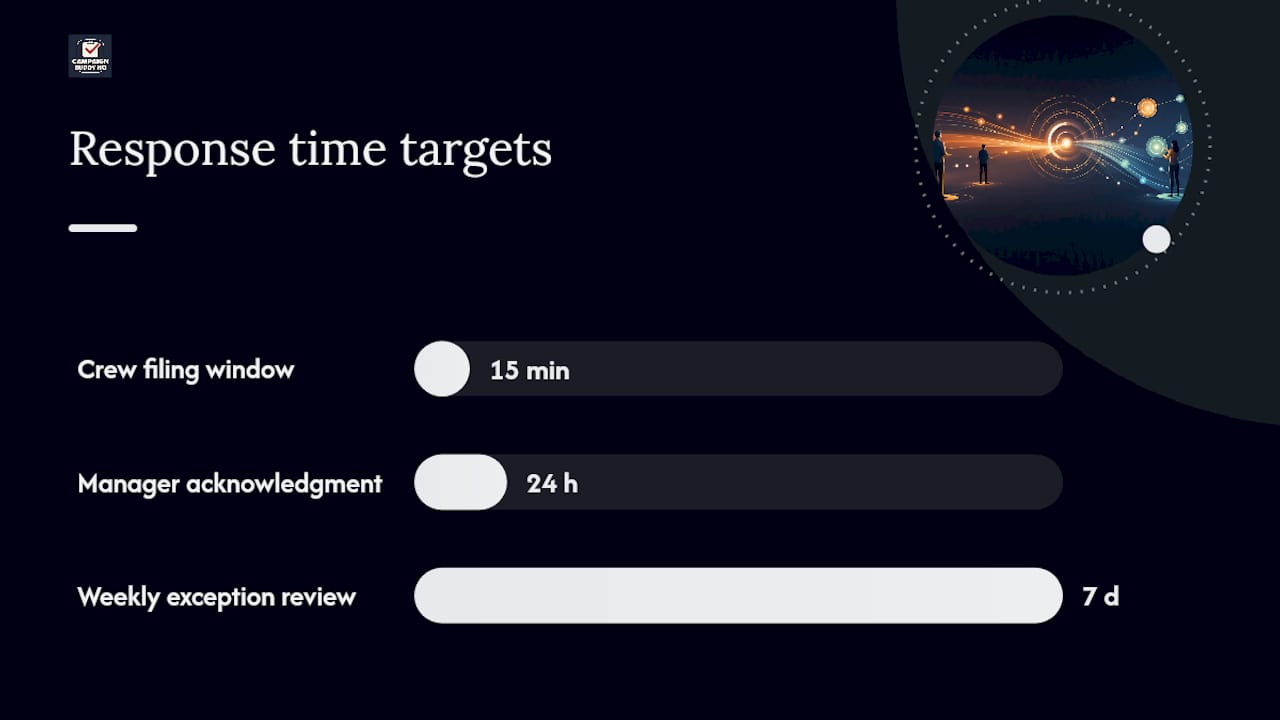
- Require same-day filing. Where the job allows it, ask crews to log outcomes within 15 minutes of finishing a task, while the details are still fresh.
- Set a manager service-level agreement: acknowledge or assign follow-up on every report within 24 hours.
- Automate the acknowledgment. A system that auto-assigns an owner and a deadline the moment a report lands removes the excuse for delay.
- Run a weekly exception review specifically to catch skipped fields, missing photos, or reports that came in late.
Pro Tip: Treat the 24-hour acknowledgment rule as non-negotiable, even when the acknowledgment is just "reviewed, no action needed." Silence is what trains people to stop filling out the free-text field carefully.
Real-time capture paired with a fast manager response is what keeps entries honest instead of filled in loosely after the fact, sometimes called "pencil-whipping" on paper forms.
How Do You Roll Out a New Reporting Cadence in Three Weeks?
Standardizing a reporting habit doesn't need a quarter-long change program. A three-week rollout built around pilot, enforcement, and refinement gets most teams to a working cadence fast.
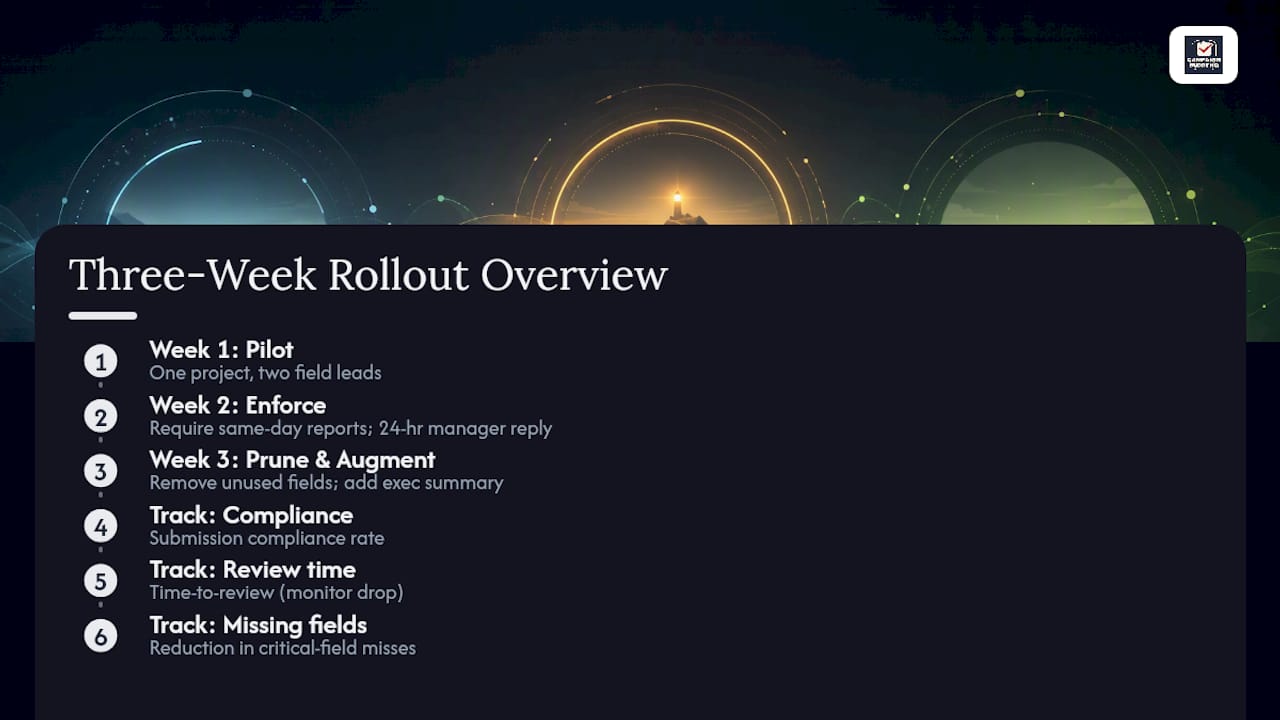
Week 1, pilot and co-design. Pick one project and two field leads. Build the template with them, not for them, so the fields reflect what they actually see on-site.
Week 2, enforce and close the loop. Require same-day submissions and the 24-hour manager response starting immediately. Begin tracking compliance daily.
Week 3, prune and augment. Remove any field nobody's filling in accurately. Add a short executive summary or light automation where it's clearly missing. Measure where you landed.
Track three numbers throughout: submission compliance rate, time-to-review, and the reduction in reports missing a critical field. If compliance is climbing and time-to-review is dropping by week three, the cadence is ready to scale past the pilot team.
What Makes a Field Reporting Dashboard Actually Useful?
A dashboard earns its screen time only if it answers a manager's top three questions in under a minute. If someone has to click through five tabs to find out whether a crew hit its numbers this week, the dashboard has failed at its one job.
Well-designed dashboards pair the numbers with a short executive summary and a small set of implied next actions, so a weekly report reads in about five minutes instead of turning into a research project. That short summary is often the difference between a report that gets read and one that gets archived unread.
Build the delivery around a few habits:
- Deliver reports where people already work: in-app, email, or a channel like Slack, not a separate portal nobody remembers to check.
- Keep every reporting deadline on one shared calendar visible to the whole team.
- Cap weekly summaries at 2 to 4 implied actions, not a status dump.
- Hold off on AI-generated summaries until the underlying data is consistent. Summarizing messy inputs just produces confident-sounding nonsense faster.
A field dashboard built around action rather than raw data volume is what turns a weekly review from a status meeting into a decision meeting.
How Campaign Buddy HQ Approaches Cadence in the Field
Campaign Buddy HQ builds daily and weekly planning directly into its workflow so outreach teams log doors, calls, texts, and registrations the same day they happen, not three days later from memory. Weekly summaries roll that activity up automatically, which matches the executive-summary approach that keeps reviews short and decision-focused.
The gap between a campaign that tracks outreach and one that acts on outreach data almost always comes down to whether the numbers get reviewed on a schedule or just accumulate.
Billy's writing on campaign reporting for managers and outreach tracking workflows informed this guide's emphasis on same-day logging and weekly review discipline, drawn from patterns seen across both political and general field operations.
What Would I Do Next Week if I Were Running This?
Pick a pilot project and two field leads today. Don't overthink the selection. Choose 5 KPIs, not 15, and put the 30-minute weekly review on everyone's calendar before the week starts. Require same-day logging and a 24-hour manager response for the pilot only, then judge the results before rolling it out further.
— Billy
Put the Cadence on Autopilot With Campaign Buddy HQ
Campaign Buddy HQ turns this entire playbook into daily workflow instead of a spreadsheet someone has to remember to update. Daily outreach logging replaces the 5-minute scan, built-in weekly summaries replace the manual executive-summary write-up, and follow-up assignments handle the 24-hour manager response automatically instead of relying on someone's memory.
If you're a campaign manager or organizer trying to install this exact cadence, from same-day logging to a weekly review your team can read in five minutes, the fastest way to see it working is to try it on your own outreach data. Campaign Buddy HQ offers a 7-day free trial with no credit card required. Start the trial at Campaign Buddy HQ and run your first weekly review before the week is out.
Sources
- Reporting Cadence
- Dashboard design tutorial
- How to create winning daily reports in construction
- Construction field report software: 2026 Buyer's Playbook | Dan Cumberland Labs