

Track volunteer hours per shift with these required fields: volunteer name, date, start and end time (or total hours), activity type, location or turf, and a coordinator confirmation. Keep one canonical system for logging and exporting that data, no side spreadsheets, no duplicate logs. Everything else, from mobile check-ins to rural fallback templates, is detail layered on top of that one rule.
TL;DR:
- Accurate logging requires six fixed fields per shift: volunteer ID, date, hours or times, activity type, turf, and confirmation; optional fields provide productivity insights.
- Verifying hours involves assigning turf beforehand, using check-ins like QR codes or GPS, and peer-checks for remote shifts, especially in low-signal areas with fallback paper sheets.
- Weekly exports with standardized formats and regular audits improve data integrity, helping campaign teams track volunteer activity, recognize milestones, and plan more effectively.
- Common mistakes include missing required fields, duplicate entries, and time zone errors; enforcing strict rules and timely reconciliation prevent these issues.
- The best tracking tools should support mobile check-in, flexible exports, offline mode, and turf integration; Campaign Buddy HQ offers a comprehensive solution built for rural and low-bandwidth conditions.
Table of Contents
- Why Accurate Volunteer Hour Tracking Matters for Campaign Operations
- What Fields Should You Track for Every Volunteer Shift?
- How Do You Collect and Verify Hours Across Different Shift Types?
- What Should You Look for in Volunteer Hour Logging Tools?
- How Do You Turn Logged Hours Into Usable Reports?
- What Are the Most Common Volunteer Hour Tracking Mistakes?
- A Coordinator's Take on What Actually Breaks Volunteer Tracking
- Get Volunteer Hour Tracking Right From Day One With Campaign Buddy HQ
- Sources
Why Accurate Volunteer Hour Tracking Matters for Campaign Operations
Clean records shape three things: scheduling, retention, and reporting. Coordinators use hour totals to spot which turf is under-covered, which shifts draw no-shows, and which volunteers are ready for a team lead role. Milestone recognition, thanking someone publicly for hitting 100 hours of canvassing, only works if the number is real.
Poor tracking creates real damage. Campaigns lose the ability to answer basic questions: how many doors got knocked last week, which volunteers are burning out, whether a phonebank shift is worth the staff time to run.
- Scheduling breaks down when coordinators can't see actual capacity versus planned capacity.
- Retention suffers because volunteers who aren't recognized for hours logged tend to drift away.
- Internal reporting to candidates or funders becomes guesswork instead of fact.
- Audits turn into arguments when nobody agrees on what happened last Tuesday.
Digital scheduling tools that let volunteers view shifts, sign up, and confirm attendance with one tap cut coordinator workload by about 40% compared with spreadsheet-based tracking. That time savings compounds every week of a campaign cycle.
What Fields Should You Track for Every Volunteer Shift?
Every shift record needs a fixed set of fields, no exceptions, no optional versions coordinators skip when they're busy.
- Volunteer ID or name. Use a consistent identifier so hours attach to one person across every shift type.
- Date. Standard format (MM/DD/YYYY), no shorthand that different team members interpret differently.
- Start and end time, or total hours. Pick one method campaign-wide. Mixing "9:00 to 11:30" with "2.5 hours" across different logs creates conversion errors during exports.
- Activity type. Canvassing, phone bank, text bank, data entry, event staffing. Use a fixed dropdown list, not free text.
- Location or turf identifier. Precinct number, neighborhood name, or route code, whatever your voter file uses.
- Coordinator confirmation. A checkbox or initials confirming the shift actually happened as logged.
Optional fields add real insight without adding much overhead: doors knocked per hour, contacts made, or a short notes field for issues on the turf (a locked gate, a hostile response, a broken doorbell). These numbers help you compare shift productivity later, but they shouldn't block a record from being saved if left blank.
One formatting rule worth enforcing early: activity labels should come from a fixed list, and timestamps should use one time zone standard for the whole campaign, even if volunteers are logging from three states away for a phone bank.
How Do You Collect and Verify Hours Across Different Shift Types?
Canvassing, phone banking, and remote shifts each need their own collection step, but the verification logic stays the same: log it, confirm it, timestamp it.
In-person canvassing. Assign turf before the shift starts. Have volunteers check in with a QR code, a GPS-stamped app tap, or a coordinator sign-in sheet at the staging location. At the end of the shift, a coordinator reviews the door count against the turf assigned and confirms the hours in the system before the volunteer leaves.
Phone and text bank shifts. Log session start and end time in the tool volunteers are using. Capture call or text counts and outcomes (contact made, voicemail, wrong number) as part of the same session record, not a separate tally sheet.
Remote and data-entry shifts. These need timestamped login and logout, plus a peer-check step. Have a second volunteer or coordinator spot-check a sample of the work against the hours logged, especially early in the cycle when new volunteers are still learning the workflow.
Low-bandwidth fallback. In rural areas or venues with no signal, hand out a paper shift sheet with the same six required fields, then designate one coordinator to upload that data into the canonical system within 24 hours. Offline-capable tools or a single designated uploader reduce data loss far more reliably than hoping five different volunteers remember to enter their own hours later.
Pro Tip: Send reminder texts 24 hours and again 2 hours before a shift. That cadence alone cuts no-shows by roughly 35%, which means fewer gaps in your hour logs and fewer turf maps with holes in them.
What Should You Look for in Volunteer Hour Logging Tools?
Whatever system you pick, run it against five practical tests before you commit a campaign's data to it.
- Mobile check-in. Volunteers should be able to log a shift from a phone at the door, not from a desktop three days later.
- Export flexibility. CSV and Excel exports with consistent headers, not a locked proprietary format you can't hand to a treasurer or compliance reviewer.
- Route or turf sync. The tool should tie hours to the same turf identifiers your voter file already uses.
- Admin oversight. Coordinators need a way to confirm or flag entries, not just view a raw feed.
- Offline mode. Critical for rural precincts where cell signal drops mid-shift.
If you're building your own tracking sheet rather than using a dedicated field app, this column set works as a starting template:
| Column | Example value |
|---|---|
| Volunteer_ID | volunteer_name |
| Date | date |
| Start_Time | start_time |
| End_Time | end_time |
| Activity_Type | Canvassing |
| Turf_ID | location |
| Doors_Knocked | hours |
| Confirmed_By | coordinator_jsmith |
Use a mobile field app once you have more than a handful of volunteers running simultaneous shifts. A spreadsheet works fine for a small team or an early campaign phase. Paper plus a single coordinator upload is the right call for any location where connectivity can't be trusted, not a backup plan you improvise on shift day.
How Do You Turn Logged Hours Into Usable Reports?
Reporting is where sloppy logging finally shows up as a real problem, so build the habit of exporting on a fixed schedule rather than only when someone asks for numbers.
Export weekly using one consistent header row across every team and every shift type. Standardizing that exact column order prevents mapping errors when you merge files from three different coordinators who each ran their own canvass day.
Before you present any report, run a short audit:
- Scan for duplicate volunteer entries on the same date and shift block.
- Cross-check confirmed entries against the coordinator sign-off field, not just the raw log.
- Look for rounding oddities, like a dozen shifts all logged at exactly 3.0 hours.
Regular audits and iterative process fixes materially improve data quality over the life of a campaign, not just at the end.
The three reports most campaigns actually need: cumulative hours by volunteer (for recognition and burnout checks), weekly outreach broken out by activity type (for planning), and a milestone list flagging anyone crossing a threshold worth a thank-you call.
What Are the Most Common Volunteer Hour Tracking Mistakes?
Most tracking failures trace back to the same handful of causes, and each one has a straightforward fix.
- Missing required fields. Enforce them at check-in. A form that won't submit without a turf ID and a confirmation checkbox stops the problem before it starts.
- Late or missing entries. Set a 48-hour reconciliation window where coordinators chase down unconfirmed shifts before they're forgotten entirely.
- Duplicate entries. Usually caused by a volunteer logging a shift twice, once on paper and once in the app. Assign one entry method per shift type and stick to it.
- Timezone and timestamp errors. Lock the whole campaign to one time zone in the system settings, even for remote phone bank volunteers dialing from elsewhere.
- Unresolved discrepancies. Anything that can't be reconciled within a week goes to a coordinator for a direct call to the volunteer, not an indefinite "pending" status.
Pro Tip: Clear role expectations, like a target of 20 doors an hour for canvassing, help volunteers self-report more consistently because they know what a normal shift looks like before they log it.
A Coordinator's Take on What Actually Breaks Volunteer Tracking
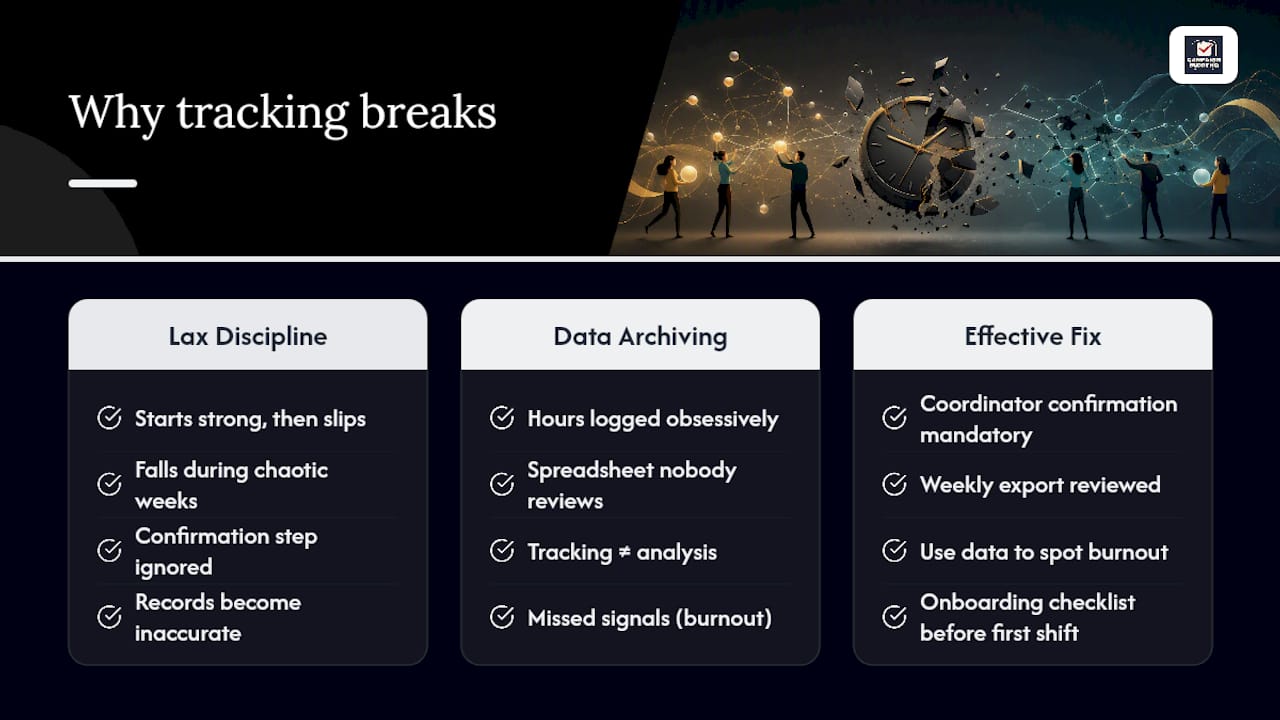
Most tracking failures aren't a tooling problem. They're a discipline problem. Campaigns adopt a solid check-in process in week one and then let it slide once the schedule gets chaotic, which is exactly when accurate records matter most. The campaigns that hold up under pressure are the ones that treat the confirmation step as non-negotiable, even during a crunch week before a filing deadline or an event.
The other pattern worth naming: campaigns that track hours obsessively but never use the data. A spreadsheet nobody reviews isn't tracking, it's just archiving. The point of a coordinator confirmation and a weekly export isn't paperwork. It's catching the volunteer who's about to burn out, or the turf that's been quietly under-covered for two weeks straight. Campaign Buddy HQ's onboarding checklist exists because the fix starts before the first shift, not after the third missed check-in.
— Billy
Get Volunteer Hour Tracking Right From Day One With Campaign Buddy HQ
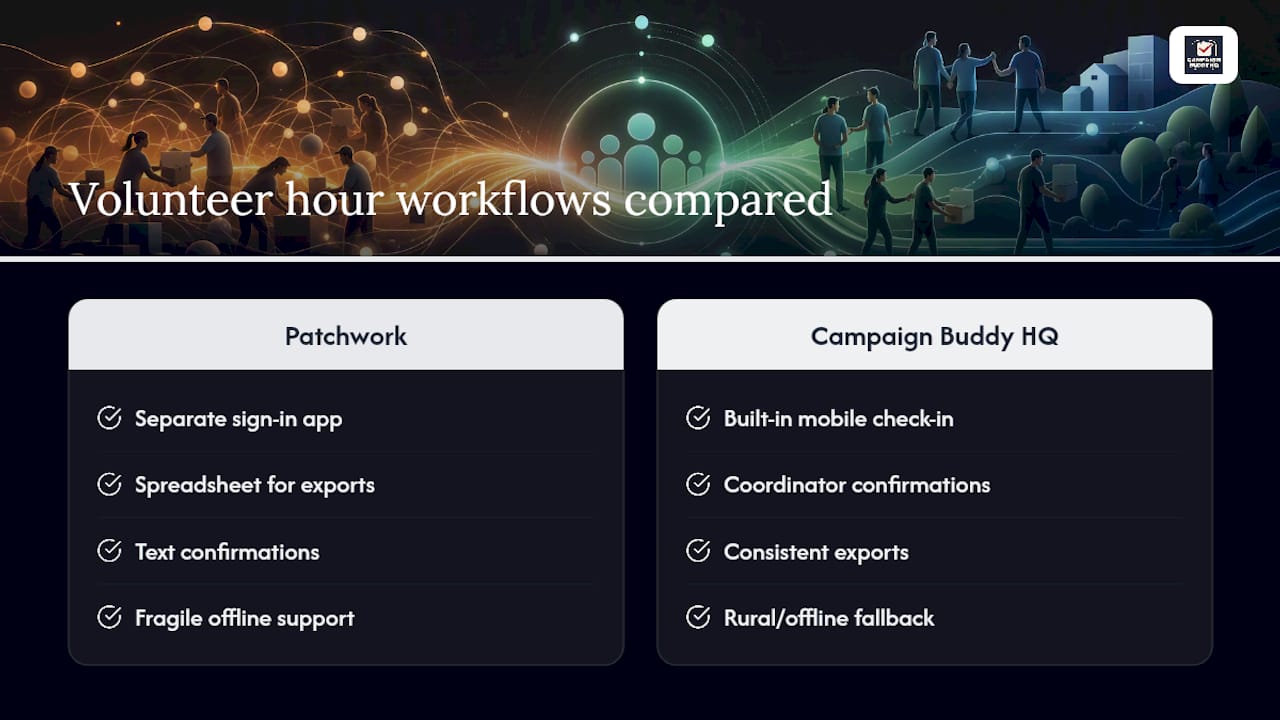
Every workflow covered above, mobile check-in, coordinator confirmation, consistent exports, rural fallback logging, is exactly what Campaign Buddy HQ was built to run without a spreadsheet patchwork holding it together. Instead of stitching together a sign-in app, a separate spreadsheet, and a text chain for confirmations, you get one canonical system where outreach logging, supporter tracking, and daily planning live in the same place.
That matters most for campaigns working rural or low-density turf, where a coordinator upload workflow needs to actually hold up when the signal drops. Campaign Buddy HQ's planning and outreach-logging tools are built around that real-world constraint, not a demo environment with perfect connectivity.
Run it against the criteria from earlier in this piece, mobile check-in, export flexibility, offline reliability, before you commit. Start the 7-day free trial, no credit card required, and see whether your next canvass weekend produces a report you can actually trust.
Sources
For ready-to-use templates and deeper process guidance, start with Campaign Buddy HQ's volunteer onboarding checklist and its guide to recruiting volunteers. For broader data hygiene practices, review this nonprofit continuous improvement guide.