

Voter registration tracking, in campaign terms, means logging every form a canvasser collects, tying it to a supporter's record in your CRM, and measuring drive progress against your goals. The single best practice is integrating registration data directly into your unified supporter record rather than a standalone spreadsheet, since that prevents duplicated outreach and dropped follow-up. A platform like Campaign Buddy HQ can handle this in-house, and Project Vote's field guidance backs the underlying discipline: assign, track, and audit every form.
TL;DR:
- Using integrated supporter records prevents duplicates and dropped follow-up, especially when registration forms are matched against existing CRM contacts.
- Offline-capable mobile forms with essential fields like legal name, date of birth, and address are vital for rural or signal-deprived areas, ensuring data accuracy.
- Weekly metrics such as form completion rates, acceptance rates, and follow-up times help measure drive effectiveness and guide coaching efforts.
- Proper setup requires understanding state-specific rules, implementing secure access controls, and establishing clear submission and follow-up workflows within 72 hours.
- Connecting registration data automatically to the CRM, with household and deadline management, ensures efficient outreach and legal compliance during the drive.
Table of Contents
- Core Features You Need to Track Registrations Well
- Setup Checklist: Your First 72 Hours
- What to Measure Every Week (and What to Do About It)
- Compliance and Quality Control That Actually Holds Up
- Connecting Registration Data to Your CRM and Dashboards
- How Field Teams Actually Run This Day to Day
- Where Campaign Buddy HQ Fits Into Your Registration Drive
- Sources
Core Features You Need to Track Registrations Well
Not every tracking tool handles the messy reality of a registration drive. Look for these capabilities before you commit to a system.
Field capture that works offline. Mobile forms are the standard, but rural precincts and basements lose signal constantly. Your tool needs offline capture with sync-on-reconnect, plus optional scanning for paper forms collected at tables or events. The fields that matter most for later matching are legal name, date of birth, address, and county, since these are what election offices use to confirm a submission.
One record per person. When a registration comes in, it should attach to that person's existing contact or household record in your CRM, not create a floating duplicate. This single-record view is what lets a canvasser see "this household already has three registered voters" before knocking again.
Metadata that makes forms traceable. Every form needs a collector ID, shift, event name, and location tag. Without this, you cannot answer basic questions like which shift underperformed or which location needs more coverage.
Track these status states on every form:
- Submitted, meaning collected but not yet reviewed
- Pending, meaning under office review or awaiting county confirmation
- Confirmed, meaning the voter file shows the registration processed
- Rejected or incomplete, flagged for follow-up with the original respondent
Access controls matter here too. Registration forms carry sensitive personal data, so limit edit rights to a small QC team and set a retention policy before your first shift, not after.
Setup Checklist: Your First 72 Hours
Standing up a tracking system is fast if you sequence it correctly. Do these in order.
- Pull your state's factsheet. NonprofitVote's walkthrough covers training requirements, photocopying rules, receipt requirements, and submission deadlines by state, and you need this before anything else.
- Order blank forms if your state requires official paper, and confirm your training obligations for anyone collecting registrations.
- Build your CRM scaffolding: collector IDs, event codes, and dropdown fields for status and location, standardized so nobody free-types "downtown" one day and "Main St area" the next.
- Set a submission cadence. A common submission cadence is weekly; some counties require faster turn-in. Name one staffer responsible for every batch leaving the building.
- Train volunteers on completeness checks, nonpartisan conduct rules, and safe handling of completed forms.
- Launch a daily QC routine: a visual check of the day's batch, an exception report for anything incomplete, and secure storage before submission.
Pro Tip: Assign one "QC hour" at the end of every shift, before anyone leaves the building. Catching a missing signature at 6 p.m. on collection day is a five-minute fix. Catching it three weeks later, after the batch is submitted, is often unfixable.
What to Measure Every Week (and What to Do About It)
Raw form counts tell you activity happened. They don't tell you if the drive is working. Track these five numbers weekly:
- Total forms collected, your baseline volume
- Complete rate, the share of forms with every required field filled
- Accepted-by-office rate, what the county actually processes versus what you submitted
- Forms per collector or shift, your productivity signal
- Follow-up SLA, how fast incomplete forms get resolved after flagging
Counting forms per worker or per shift gives you a concrete productivity metric that's genuinely useful when a funder asks what their money bought.
Build a simple manager dashboard around three views: daily progress against your target, completion rate by location, and a leaderboard of top collectors. That last one is not just for morale. It tells you who to pair with a struggling volunteer for on-the-job coaching.
Your workflow should route incomplete forms into a re-knock or phone follow-up queue automatically, and log a confirmation task once the county processes the registration. Those weekly numbers are also exactly what belongs in your stakeholder reporting, where funders want form counts by shift, not vague activity summaries.
Compliance and Quality Control That Actually Holds Up
State rules vary enough that a checklist built for one county can be illegal in the next. Before you scale a drive, confirm training requirements, photocopy and scan permissions, receipt obligations, and hard submission deadlines for your specific state, using a state factsheet as your starting point.
On the QC side, Project Vote's recommended practices include:
- Daily visual review of every batch before it leaves the office
- Tagging incomplete forms immediately rather than discovering them at turn-in
- An audit log tying each form to its collector and shift
- Secure, access-limited storage for any retained copies
If your organization runs 501(c)(3)-adjacent nonpartisan programming alongside registration work, put your nonpartisan policy in writing and have staff sign an affirmation. A nonprofit legal resource on 501(c)(4) structure is worth a read if your organization spans both advocacy and nonpartisan registration work. When QC flags a problem batch, notify your compliance lead the same day, not at the next weekly meeting.
Connecting Registration Data to Your CRM and Dashboards
The cleanest flow looks like this: field app captures the form, it lands in a single CRM record, gets matched against the voter file, and rolls up into a dashboard automatically. No CSV exports in between.
Matching only works if you map fields consistently: full legal name, date of birth, address, and county are the minimum. Expect imperfect match rates even with clean data, since name variants and address formatting differences are common. ActBlue's CRM documentation shows how combining field activity with voter-file matching supplies the registration-status field you need for accurate outreach lists later.
Set up these automations if your tool supports them:
- An immediate follow-up task fires when a form is marked incomplete
- A daily exception report surfaces anything QC hasn't reviewed
- A funder-ready export runs on a schedule, not manually pieced together
Deduplication rules and a household ID matter more than they sound. Without them, the same voter can show up as three different "new" registrations after three separate canvass shifts. Deadline visibility by location also matters here. Since registration cutoffs vary by state, your system should surface the correct deadline based on where a supporter actually lives, and a timestamp showing when and where each record originated protects you if a match is ever questioned. Organizing this correctly starts with building a real supporter list before the drive begins, not retrofitting one after.
How Field Teams Actually Run This Day to Day
Mornings start with a quick sync check: did last night's batches load into the CRM, and does every collector have a working ID and event code before doors open? Midday, someone should spot-check a handful of submitted forms for completeness, not wait until end of day when fixing a mistake means re-contacting a voter.
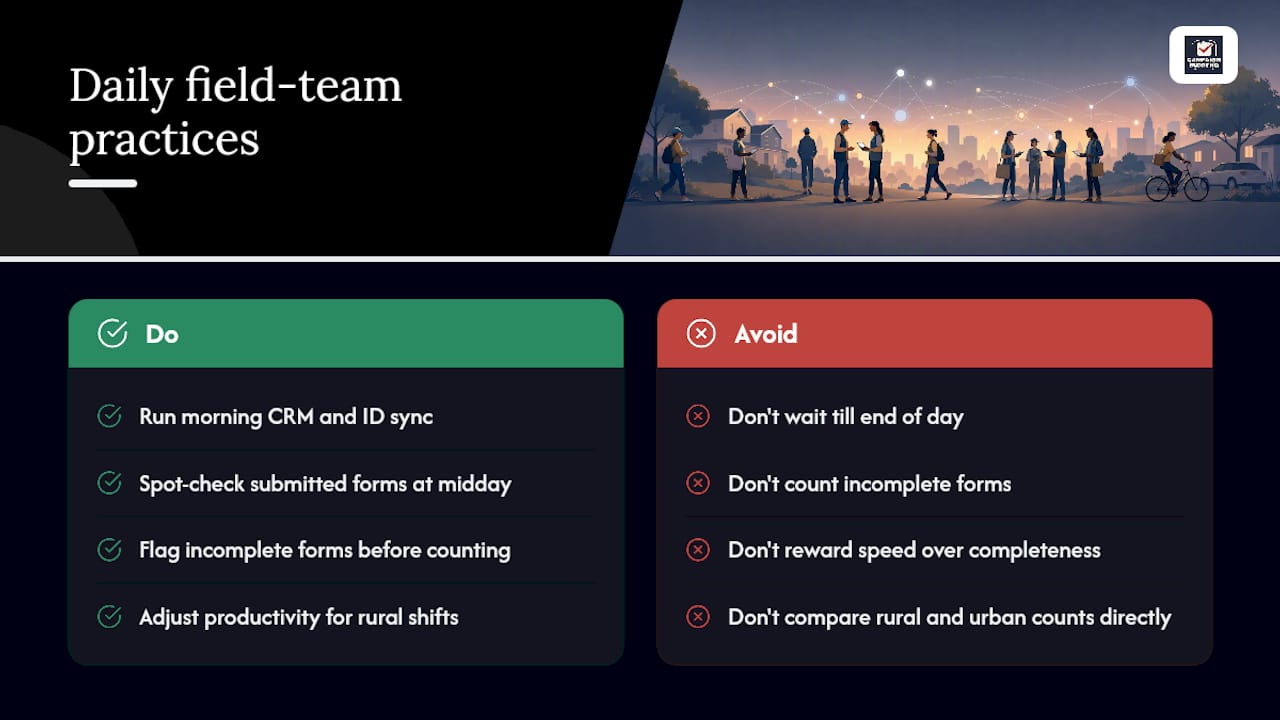
The real tradeoff is speed versus completeness. A crew racing to hit a door quota will turn in sloppier forms. Set a conservative acceptance rule: anything missing a required field gets flagged before it counts toward the daily total, not after.
In rural or low-density areas, shifts run longer between doors, so per-collector productivity numbers need context. A rural shift with 15 forms might outperform an urban shift with 40, once you account for drive time. That's a lesson baked into how Campaign Buddy HQ's outreach tracking handles rural workflows, and it's one campaigns learn the hard way if their tool doesn't account for it.
— Billy
Where Campaign Buddy HQ Fits Into Your Registration Drive
Everything covered here, mobile capture, per-collector logging, CRM tie-in, status dashboards, and QC flagging, is what Campaign Buddy HQ was actually built to run. Instead of stitching together a form app, a spreadsheet, and a separate reporting tool, your team logs registrations the same way you log doors, calls, and texts, all inside one supporter record.
You can test the full workflow with a 7-day free trial, no credit card required, before committing to the monthly subscription. If you want a head start on the compliance side, pair your trial with the Voter Registration Drive: A Community Leader's Guide for a state-by-state rundown of forms and deadlines. From there, schedule an implementation walkthrough and get your collector IDs, event codes, and dashboards set up before your next shift, not after it. Start your trial at Campaign Buddy HQ today.
Sources
- GOTV Campaigns: Turn engagement into voter turnout — Quorum
- A step-by-step walkthrough to using the voter registration drive guides — NonprofitVote
- Manual for Nonprofit Staff — Project Vote