

AI can draft effective campaign texting scripts, but only when paired with documented human review and TCPA-compliant sending. Used correctly, AI texting scripts are drafts, not finished products: AI-generated language for GOTV pushes, persuasion contact, fundraising asks, and volunteer recruitment, written fast and then checked by a real person before it reaches a single phone.
The core rule is simple. Let AI draft. Always have a human review the copy against your facts and your compliance rules. Prefer peer-to-peer (P2P) texting unless you hold documented, express opt-in for broadcast sends. Honor every STOP request the moment it arrives.
Before you send anything AI helped write, do two things:
- Confirm you have documented consent for the number of the list you're texting and the method you're using to send it.
- Run the draft through a two-person check: one pass for factual accuracy, one for tone.
Key Takeaways
Compliant, effective AI texting scripts require documented consent, a two-step human review, and strict adherence to opt-out and timing rules.
| Point | Details |
|---|---|
| AI drafts, humans approve | Never send AI-generated copy without a fact and tone review pass first. |
| Match method to list | Use P2P for persuasion and cold contact; reserve broadcast for lists with express opt-in. |
| Honor STOP immediately | Sync suppression lists across every tool so opt-outs apply everywhere at once. |
| Test before scaling | Send AI variants to a small segment and watch opt-out rate before a full rollout. |
| Use a workflow tool | Campaign Buddy HQ centralizes drafting, approvals, outreach logging, and suppression lists in one platform. |
Table of Contents
- What AI Texting Scripts Cover and When to Use Them
- How Do You Stay TCPA Compliant When Using AI Scripts?
- Script Templates and AI Prompt Scaffolds That Work
- Building a Human Review Pipeline for AI-Drafted Texts
- What Metrics Should You Track When Testing AI Scripts?
- Quick-Start Checklist for Your First AI-Assisted Send
- Why I Still Don't Trust AI to Send Without a Human in the Loop
- How Campaign Buddy HQ Fits This Workflow
- Sources
What AI Texting Scripts Cover and When to Use Them
AI texting scripts, in the campaign sense, mean AI-drafted SMS content for political and advocacy outreach: GOTV reminders, persuasion contact, fundraising appeals, and volunteer asks. Nothing here applies to marketing copy or social captions. It's outreach text, and it lives inside a regulated channel.
The method matters as much as the message. P2P texting, where a human agent sends each message individually, faces fewer carrier and legal restrictions and works best for persuasion conversations and first contact with unfamiliar voters. Broadcast or autodialed texting can reach thousands of numbers at once, but the FCC's guidance on political robocalls and robotexts makes clear that autodialed messages to mobile phones require prior express consent. That makes broadcast a fit for GOTV and donor lists where you already have that consent on file, not for cold outreach.
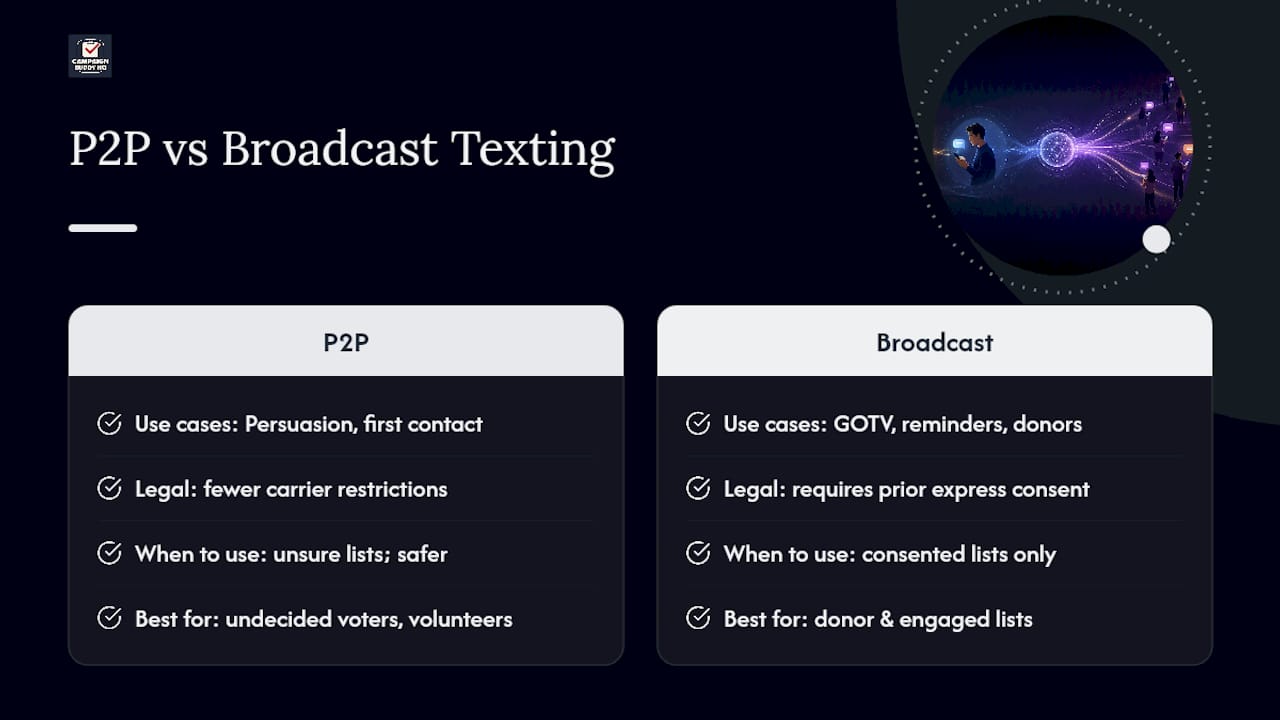
A practical field guide to voter contact approaches breaks this down further: use P2P for undecided voters and volunteer recruitment, save broadcast for reminders to people who've already engaged. When your team isn't sure which bucket a list falls into, default to P2P. It's the safer error.
How Do You Stay TCPA Compliant When Using AI Scripts?
The Telephone Consumer Protection Act (TCPA) is still the law that governs every text your campaign sends, AI-drafted or not. It requires prior express consent for autodialed messages, clear campaign identification, and immediate honor of opt-out requests. Violations aren't hypothetical: penalties run $500 to $1,500 per message, and that's per message, not per campaign.
Here's the operational sequence that keeps you inside the law:
- Verify consent before drafting. Know which list segment you're texting and whether it has documented opt-in for the sending method you plan to use.
- Build STOP handling into every script. Every message needs opt-out language, and every STOP reply needs to hit a suppression list immediately, not at end of day.
- Sync suppression lists across tools. If your AI drafting tool, your texting platform, and your CRM don't talk to each other, someone who opted out on one channel keeps getting texted on another.
- Respect sending windows. Industry practice puts the safe window at 9:00 AM to 9:00 PM local time, with mid-morning and early evening as peak engagement windows. GOTV weekends can run wider frequency, but don't stretch the clock.
- Document everything. Consent records, list sources, and send logs are your defense if a complaint ever comes in.
Pro Tip: When your team debates whether a list has "good enough" consent, treat that hesitation as your answer. Route it to P2P and keep the debate for your compliance file, not your legal defense.
For nonprofits and advocacy groups worried about liability exposure beyond texting rules, legal guidance on protecting organizational assets is worth a read before you scale outreach.
Script Templates and AI Prompt Scaffolds That Work
Every effective campaign text follows the same skeleton: opener, campaign ID, one ask, one call to action, opt-out line. AI is good at filling that skeleton fast. It's bad at knowing when to stop adding detail, so your prompts need guardrails.
Four templates cover most campaign needs:
- GOTV: "Hi [Name], it's [Campaign] reminding you that Election Day is [Date]. Your polling place: [Location]. Need a ride? Reply YES. Reply STOP to opt out."
- Persuasion: "Hi [Name], [Volunteer name] here with [Campaign]. [Candidate] is fighting for [single issue]. Can we count on your support? Reply YES/NO. STOP to opt out."
- Fundraising: "[Name], we're $[amount] from our goal by [deadline]. A $[amount] gift today gets us there. [Short link]. STOP to opt out." (Pair this with a fundraising outreach guide for donor segmentation.)
- Volunteer ask: "Hi [Name], [Campaign] needs canvassers this Saturday in [Neighborhood]. Two hours, big impact. Reply YES to sign up. STOP to opt out." (See volunteer recruitment guidance for follow-up sequencing.)
Microcopy rules that hold across every template:
- Personalize with a first name and a specific local detail, not a generic "supporter."
- Make one ask per message. Two asks split attention and tank response rates.
- Use short links and stay under 160 characters where possible.
A solid AI prompt scaffold includes required facts (candidate name, date, location), explicit restrictions (no policy predictions, no speculation about opponents), mandatory opt-out text, and a length cap. Ask the AI to produce three short variants, not one long draft. Then a human picks the strongest line and tightens it.
Pro Tip: Never let AI generate the final send copy. Generate three drafts, let your reviewer pick the strongest phrase from each, and hand-assemble the final version. That extra five minutes is where authenticity survives.
Building a Human Review Pipeline for AI-Drafted Texts
Two checks, not one, catch what matters. First pass: factual accuracy and policy compliance, checking dates, locations, and claims against your campaign's approved fact sheet. Second pass: does it sound like your campaign, not like a chatbot? These need different reviewers, because the person checking facts often reads past tone problems.

Disclosure is where campaigns get nervous, and rules vary by state. When in doubt, disclose AI involvement in the first message rather than hide it. Industry reporting on AI in political texting documents real ethical concern about bots impersonating candidates or spreading false claims, and that reputational risk usually outweighs whatever awkwardness disclosure adds.
Build in safeguards beyond the two-pass review: lower the AI's creative settings for factual content, keep suppression lists current across every tool, and route any flagged or hostile reply to a live staffer instead of an automated response. AI should augment your volunteers, not replace the judgment call a real person makes on a tricky reply. Automation done right supports that judgment rather than removing it, as Campaign Buddy HQ's guide to automation safeguards lays out.
What Metrics Should You Track When Testing AI Scripts?
Run AI-drafted variants against a human-written control before you commit a list to either one. A small test segment, sent early, tells you more than a full rollout ever will.
Track five numbers on every send:
- Delivery rate — are messages actually landing, or bouncing on bad numbers?
- Response rate — are people engaging at all?
- Opt-out rate — your single most important red flag.
- Conversion rate — donations, RSVPs, or pledges, depending on the ask.
- Cost per contact — especially relevant when comparing P2P labor cost against broadcast platform fees.
If opt-outs spike above your baseline, pause that variant immediately rather than waiting for the campaign to finish. Academic research on AI in election campaigns notes that evidence on AI-driven outreach effectiveness is still mixed, which is exactly why testing at small scale before scaling matters more than trusting a template blind. Fold whatever variant wins into your permanent template library, and retire the one that didn't.
Quick-Start Checklist for Your First AI-Assisted Send
Before you launch a single AI-drafted text, run through this in order:
- Confirm documented consent for the list and the sending method (P2P or broadcast).
- Check your suppression list is current across every platform you use.
- Confirm sender ID and campaign identification appear in the message.
- Confirm STOP language is present and functional.
- Generate three AI draft variants using your prompt scaffold.
- Run the two-step human review: facts first, tone second.
- Lock the final copy and schedule inside your 9:00 AM to 9:00 PM sending window.
- Send to your test segment, then monitor replies in real time.
- Log outreach activity and update suppression lists post-send.
- Review your five key metrics and decide whether to scale or revise.
A step-by-step outreach guide covers the logging piece in more depth if your team is building this workflow from scratch.
Why I Still Don't Trust AI to Send Without a Human in the Loop
AI drafts faster than any volunteer team I've watched work a text bank, and the variants it produces are often sharper than what a tired staffer writes at 11 PM before a filing deadline. That's the useful part.
The part people underestimate is how confidently AI states things that aren't true. It won't flag its own error. It just writes the next sentence like nothing happened. That's why the reviewer step isn't a formality. It's the whole safeguard.
— Billy
How Campaign Buddy HQ Fits This Workflow
Every step in this guide, drafting, reviewing, sending, and logging, is easier with a system built for it instead of a patchwork of spreadsheets and text threads. Campaign Buddy HQ gives your team draft templates for common scripts, an approval workflow so nothing goes out without a second set of eyes, and outreach logging that tracks doors, calls, and texts in one place. Suppression lists and scheduling live inside the same platform, so a STOP request in one place doesn't slip through the cracks somewhere else.
None of this requires overhauling how your team already works. Campaign Buddy HQ layers onto your existing outreach plan, built specifically for the rural and low-density canvassing realities that generic CRMs ignore. Start the free 7-day trial, no credit card required, and get your first compliant AI-assisted send scheduled by the end of the week.
Sources
- Political campaign robocalls and robotexts rules | FCC
- Some are raising ethical concerns about political text messages using AI | KPBS Public Media
- The Use of AI by Election Campaigns | LSE Public Policy Review